> ## Documentation Index
> Fetch the complete documentation index at: https://docs.visitoai.com/llms.txt
> Use this file to discover all available pages before exploring further.
# Write effective Custom Instructions
> Give the agent clear, testable guidance for tone, conversation structure, and decision-making.
Custom Instructions control how the agent should communicate and make routine conversational choices. They complement Visito's built-in agent behavior; they are not a replacement for the entire internal system prompt.
 ## Separate facts from behavior
| If the instruction says… | Configure it in… |
| ------------------------------------------------------ | ----------------------------------------------------------------- |
| “Breakfast ends at 10:30 AM.” | Knowledge Base |
| “Use short paragraphs and ask one question at a time.” | Custom Instructions |
| “Escalate payment disputes to the billing team.” | Handoff Rules |
| “Send the spa menu when requested.” | Assets, with supporting behavior in Custom Instructions if needed |
Keeping these responsibilities separate makes information easier to update and behavior easier to test.
## Add Custom Instructions
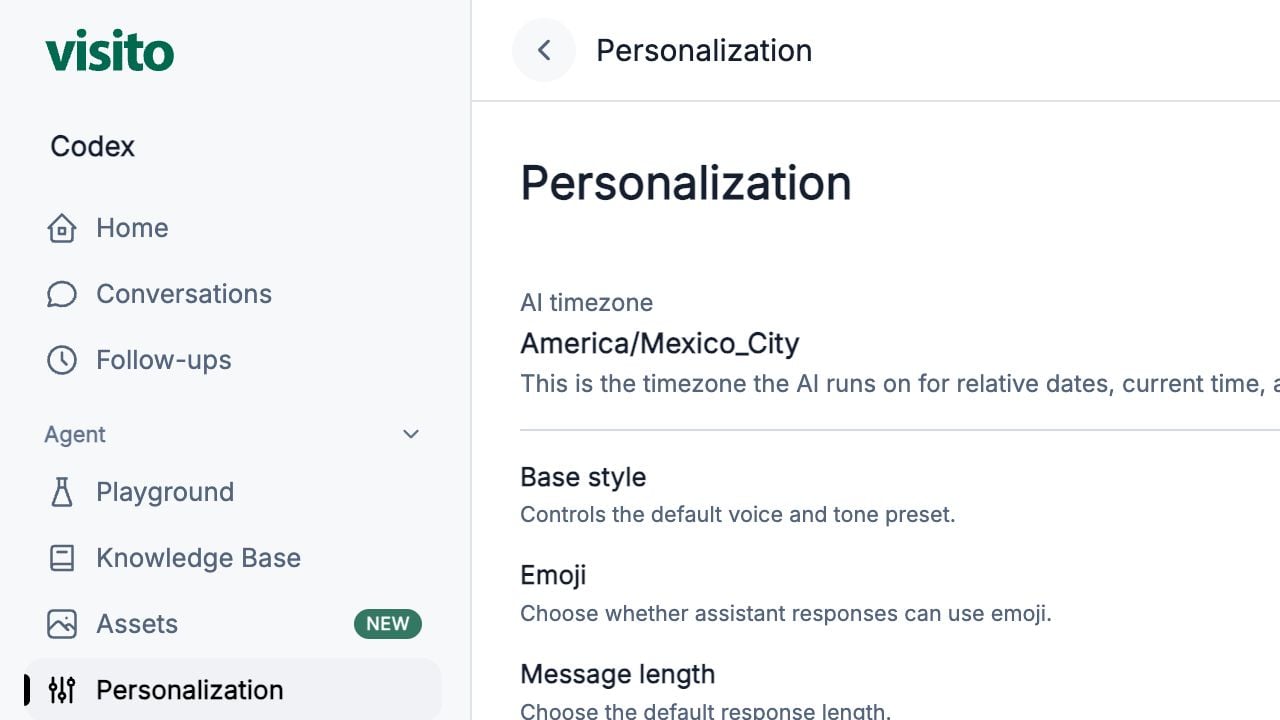
Go to **Agent → Personalization**.
Choose the base style, emoji preference, message length, conversation scope, and assistant name.
Use Custom Instructions for specific rules not already represented by those controls.
Select **Save** after reviewing the complete configuration.
Open Playground and start a new chat so the test has a clean context.
## Starter template
Replace the bracketed content and remove rules that do not apply:
```text theme={null}
Act as a helpful concierge for [brand or property group].
Communication:
- Use short paragraphs and plain language.
- Ask only one follow-up question at a time.
- Address the guest by name when it is known, but do not repeat it in every message.
- Match the guest's language when possible.
Accuracy:
- Never invent prices, availability, policies, reservation details, or confirmation.
- When a question depends on the property and the property is unclear, ask which property the guest means.
- Clearly distinguish a request from a confirmed arrangement.
Conversation flow:
- Answer the guest's immediate question before suggesting related services.
- Collect only the information needed for the current task.
```
## Write instructions the agent can follow
Good instructions are:
* **Specific** — describe an observable response or decision.
* **Short** — one rule per bullet.
* **Prioritized** — put important accuracy and escalation rules first.
* **Compatible** — avoid rules that contradict each other or the Knowledge Base.
* **Testable** — you can write a Playground message that proves whether the rule worked.
### Vague versus testable
| Avoid | Prefer |
| ----------------------------------- | --------------------------------------------------------------------------- |
| “Be helpful.” | “Answer the immediate question first, then offer one relevant next step.” |
| “Do not be too verbose.” | “Use no more than three short paragraphs unless the guest requests detail.” |
| “Handle complaints well.” | “Acknowledge the concern before asking for reservation details.” |
| “Always collect guest information.” | “Collect only fields required for the current booking or handoff.” |
## Useful instruction patterns
### Concise hospitality responses
```text theme={null}
Lead with the direct answer.
Use bullets only when listing three or more items.
Do not repeat details the guest already confirmed.
Ask one question at the end only when more information is required.
```
### Avoid accidental promises
```text theme={null}
Do not describe requests as confirmed.
For early check-in, late check-out, upgrades, and special arrangements, state the documented policy and explain when team confirmation is required.
```
### Multi-property clarification
```text theme={null}
When the answer may differ by property and no property is established, ask the guest to choose the property before giving property-specific details.
```
## What to avoid
* Passwords, API keys, private links, or other secrets
* Long copies of policies that belong in the Knowledge Base
* Instructions to ignore product safeguards or connected-system results
* Rules that promise availability or prices without a provider result
* Handoff triggers that should be configured and tested in Handoff Rules
* Dozens of overlapping tone requirements
* Hidden operational notes that should instead become a handoff
## Test the instructions
Use a new Playground chat and test:
1. A simple FAQ that should receive a direct answer
2. A question missing the property
3. A request the team must confirm
4. A complaint
5. An explicit request for a human
6. A question outside the configured business scope
Change one group of instructions at a time. This makes it easier to identify which rule changed the behavior.
Review the available tone, response, scope, name, and Custom Instructions controls.
## Separate facts from behavior
| If the instruction says… | Configure it in… |
| ------------------------------------------------------ | ----------------------------------------------------------------- |
| “Breakfast ends at 10:30 AM.” | Knowledge Base |
| “Use short paragraphs and ask one question at a time.” | Custom Instructions |
| “Escalate payment disputes to the billing team.” | Handoff Rules |
| “Send the spa menu when requested.” | Assets, with supporting behavior in Custom Instructions if needed |
Keeping these responsibilities separate makes information easier to update and behavior easier to test.
## Add Custom Instructions
Go to **Agent → Personalization**.
Choose the base style, emoji preference, message length, conversation scope, and assistant name.
Use Custom Instructions for specific rules not already represented by those controls.
Select **Save** after reviewing the complete configuration.
Open Playground and start a new chat so the test has a clean context.
## Starter template
Replace the bracketed content and remove rules that do not apply:
```text theme={null}
Act as a helpful concierge for [brand or property group].
Communication:
- Use short paragraphs and plain language.
- Ask only one follow-up question at a time.
- Address the guest by name when it is known, but do not repeat it in every message.
- Match the guest's language when possible.
Accuracy:
- Never invent prices, availability, policies, reservation details, or confirmation.
- When a question depends on the property and the property is unclear, ask which property the guest means.
- Clearly distinguish a request from a confirmed arrangement.
Conversation flow:
- Answer the guest's immediate question before suggesting related services.
- Collect only the information needed for the current task.
```
## Write instructions the agent can follow
Good instructions are:
* **Specific** — describe an observable response or decision.
* **Short** — one rule per bullet.
* **Prioritized** — put important accuracy and escalation rules first.
* **Compatible** — avoid rules that contradict each other or the Knowledge Base.
* **Testable** — you can write a Playground message that proves whether the rule worked.
### Vague versus testable
| Avoid | Prefer |
| ----------------------------------- | --------------------------------------------------------------------------- |
| “Be helpful.” | “Answer the immediate question first, then offer one relevant next step.” |
| “Do not be too verbose.” | “Use no more than three short paragraphs unless the guest requests detail.” |
| “Handle complaints well.” | “Acknowledge the concern before asking for reservation details.” |
| “Always collect guest information.” | “Collect only fields required for the current booking or handoff.” |
## Useful instruction patterns
### Concise hospitality responses
```text theme={null}
Lead with the direct answer.
Use bullets only when listing three or more items.
Do not repeat details the guest already confirmed.
Ask one question at the end only when more information is required.
```
### Avoid accidental promises
```text theme={null}
Do not describe requests as confirmed.
For early check-in, late check-out, upgrades, and special arrangements, state the documented policy and explain when team confirmation is required.
```
### Multi-property clarification
```text theme={null}
When the answer may differ by property and no property is established, ask the guest to choose the property before giving property-specific details.
```
## What to avoid
* Passwords, API keys, private links, or other secrets
* Long copies of policies that belong in the Knowledge Base
* Instructions to ignore product safeguards or connected-system results
* Rules that promise availability or prices without a provider result
* Handoff triggers that should be configured and tested in Handoff Rules
* Dozens of overlapping tone requirements
* Hidden operational notes that should instead become a handoff
## Test the instructions
Use a new Playground chat and test:
1. A simple FAQ that should receive a direct answer
2. A question missing the property
3. A request the team must confirm
4. A complaint
5. An explicit request for a human
6. A question outside the configured business scope
Change one group of instructions at a time. This makes it easier to identify which rule changed the behavior.
Review the available tone, response, scope, name, and Custom Instructions controls.