> ## Documentation Index
> Fetch the complete documentation index at: https://docs.visitoai.com/llms.txt
> Use this file to discover all available pages before exploring further.
# Design useful human handoffs
> Create handoff rules that trigger at the right time and give operators enough context to act.
A useful handoff does two things: it moves the right conversation to a person, and it captures enough context for that person to continue without asking the guest to start over.
 ## Start with a small rule set
Begin with high-value scenarios:
1. The guest explicitly requests a person
2. A serious property or safety issue
3. A payment, charge, or refund dispute
4. A reservation change the agent cannot complete
Add narrower rules only after reviewing real conversations. Too many broad rules can create unnecessary handoffs.
## Configure a scenario
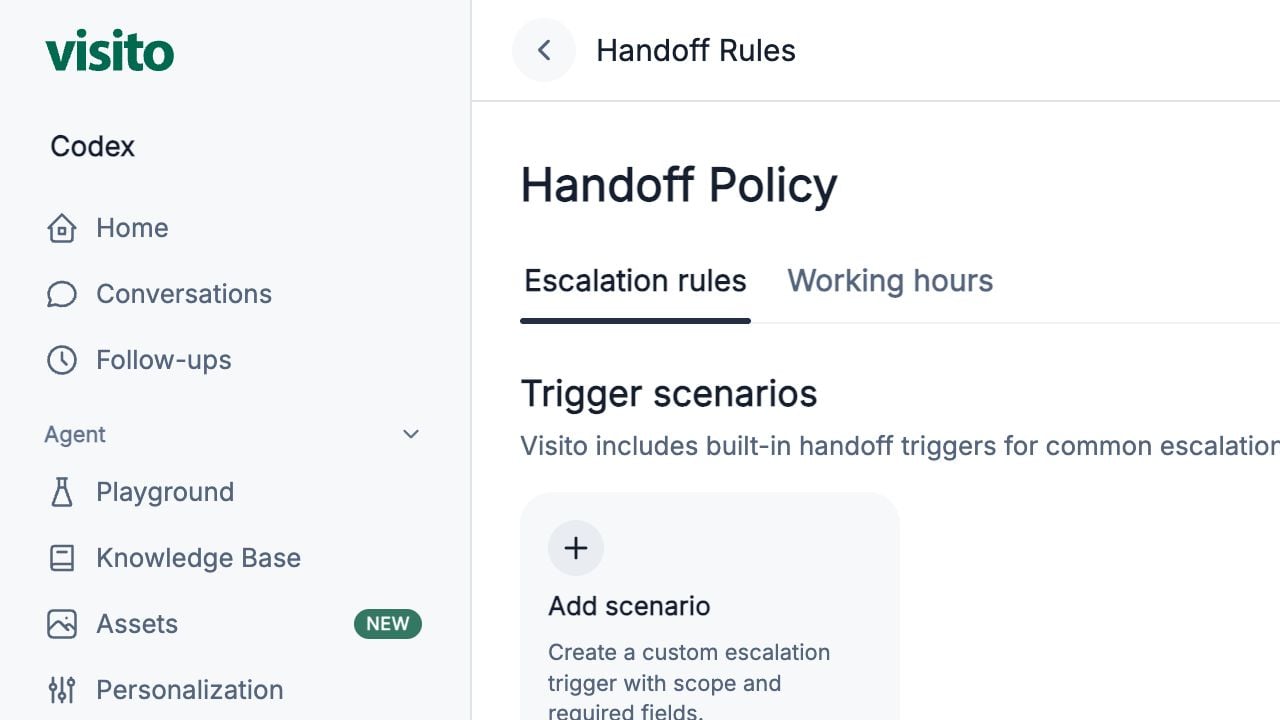
Go to **Agent → Handoff Rules** and confirm **Enable automatic handoff rules** is on.
Select **Add scenario** and give it a name an operator will understand.
State what should trigger the handoff and, when helpful, what should not.
Use selected properties when the workflow or responsible team differs by location.
Collect only information the operator needs to take the next action.
Test one message that should trigger the rule and one similar message that should not.
## Copy-ready scenarios
### Explicit request for a person
```text theme={null}
Name: Guest requests a person
Trigger:
Create a handoff when the guest clearly asks to speak with a human, employee, manager, front desk, or support agent. Do not require the guest to explain the reason before creating the handoff.
Required fields:
- Guest name, if not already known
```
### Serious room or property issue
```text theme={null}
Name: Urgent room or property issue
Trigger:
Create a high-priority handoff when a guest reports an immediate safety concern, flooding, fire or smoke, an electrical hazard, inability to access an occupied room, or another issue requiring urgent on-site attention.
Required fields:
- Guest name
- Guest phone, when not already available
- Custom field: roomNumber, when applicable
- Custom field: issueSummary
```
For urgent situations, avoid collecting nonessential details before escalating.
### Payment or charge dispute
```text theme={null}
Name: Payment or charge dispute
Trigger:
Create a handoff when a guest disputes a charge, reports being charged incorrectly, requests a refund that cannot be completed automatically, or reports a payment failure after retrying.
Required fields:
- Guest name
- Reservation ID or booking reference, when available
- Guest email or phone
- Custom field: paymentIssueSummary
```
## Choose required fields deliberately
| Scenario | Useful fields |
| ------------------ | ----------------------------------------------------------------- |
| Human requested | Guest name |
| Reservation change | Guest name, booking reference, check-in and check-out dates |
| Room issue | Guest name, guest phone, custom room number, custom issue summary |
| Payment dispute | Guest name, reservation ID or booking reference, contact method |
Scope each scenario to the properties where it applies. Do not request information already present in the conversation or connected reservation unless it must be confirmed.
## Configure working hours
Open the **Working hours** tab and enter the hours when a person can respond. The schedule uses the AI timezone configured in Personalization.
Test the same handoff:
* During working hours
* Outside working hours
* On a closed day
The agent should set accurate expectations without implying that the issue has already been resolved.
## Test both sides of every rule
| Should trigger | Should not trigger |
| -------------------------------------------------- | ------------------------------------- |
| “I need to speak to the manager.” | “Who is the hotel manager?” |
| “There is smoke coming from an outlet.” | “Where are the smoking areas?” |
| “I was charged twice.” | “What payment methods do you accept?” |
| “Please change the dates on my confirmed booking.” | “What dates are available?” |
Testing non-triggers is essential. It reveals rules that are so broad they interrupt normal self-service.
## Build an operational loop
1. Review handoffs in Home and Conversations.
2. Confirm the reason and required fields are useful.
3. Resolve the handoff with an optional audit note.
4. Identify false positives or missing scenarios.
5. Update one rule at a time and retest it.
Review switches, fields, property scope, working hours, and the operator resolution flow.
## Start with a small rule set
Begin with high-value scenarios:
1. The guest explicitly requests a person
2. A serious property or safety issue
3. A payment, charge, or refund dispute
4. A reservation change the agent cannot complete
Add narrower rules only after reviewing real conversations. Too many broad rules can create unnecessary handoffs.
## Configure a scenario
Go to **Agent → Handoff Rules** and confirm **Enable automatic handoff rules** is on.
Select **Add scenario** and give it a name an operator will understand.
State what should trigger the handoff and, when helpful, what should not.
Use selected properties when the workflow or responsible team differs by location.
Collect only information the operator needs to take the next action.
Test one message that should trigger the rule and one similar message that should not.
## Copy-ready scenarios
### Explicit request for a person
```text theme={null}
Name: Guest requests a person
Trigger:
Create a handoff when the guest clearly asks to speak with a human, employee, manager, front desk, or support agent. Do not require the guest to explain the reason before creating the handoff.
Required fields:
- Guest name, if not already known
```
### Serious room or property issue
```text theme={null}
Name: Urgent room or property issue
Trigger:
Create a high-priority handoff when a guest reports an immediate safety concern, flooding, fire or smoke, an electrical hazard, inability to access an occupied room, or another issue requiring urgent on-site attention.
Required fields:
- Guest name
- Guest phone, when not already available
- Custom field: roomNumber, when applicable
- Custom field: issueSummary
```
For urgent situations, avoid collecting nonessential details before escalating.
### Payment or charge dispute
```text theme={null}
Name: Payment or charge dispute
Trigger:
Create a handoff when a guest disputes a charge, reports being charged incorrectly, requests a refund that cannot be completed automatically, or reports a payment failure after retrying.
Required fields:
- Guest name
- Reservation ID or booking reference, when available
- Guest email or phone
- Custom field: paymentIssueSummary
```
## Choose required fields deliberately
| Scenario | Useful fields |
| ------------------ | ----------------------------------------------------------------- |
| Human requested | Guest name |
| Reservation change | Guest name, booking reference, check-in and check-out dates |
| Room issue | Guest name, guest phone, custom room number, custom issue summary |
| Payment dispute | Guest name, reservation ID or booking reference, contact method |
Scope each scenario to the properties where it applies. Do not request information already present in the conversation or connected reservation unless it must be confirmed.
## Configure working hours
Open the **Working hours** tab and enter the hours when a person can respond. The schedule uses the AI timezone configured in Personalization.
Test the same handoff:
* During working hours
* Outside working hours
* On a closed day
The agent should set accurate expectations without implying that the issue has already been resolved.
## Test both sides of every rule
| Should trigger | Should not trigger |
| -------------------------------------------------- | ------------------------------------- |
| “I need to speak to the manager.” | “Who is the hotel manager?” |
| “There is smoke coming from an outlet.” | “Where are the smoking areas?” |
| “I was charged twice.” | “What payment methods do you accept?” |
| “Please change the dates on my confirmed booking.” | “What dates are available?” |
Testing non-triggers is essential. It reveals rules that are so broad they interrupt normal self-service.
## Build an operational loop
1. Review handoffs in Home and Conversations.
2. Confirm the reason and required fields are useful.
3. Resolve the handoff with an optional audit note.
4. Identify false positives or missing scenarios.
5. Update one rule at a time and retest it.
Review switches, fields, property scope, working hours, and the operator resolution flow.