> ## Documentation Index
> Fetch the complete documentation index at: https://docs.visitoai.com/llms.txt
> Use this file to discover all available pages before exploring further.
# Build a reliable Knowledge Base
> Turn property information into focused, maintainable sources that the agent can use confidently.
A strong Knowledge Base gives the agent facts it can retrieve quickly and apply to the correct property. The goal is not to upload everything your business has—it is to provide clear, current information that answers real guest questions.
 ## What belongs where
| Content | Put it in |
| -------------------------------------------------------------------- | ------------------- |
| Check-in time, parking policy, amenities, fees, and room information | Knowledge Base |
| Tone, response format, and conversational behavior | Custom Instructions |
| Conditions that require a person | Handoff Rules |
| Menus, brochures, maps, and images the agent may send | Assets |
## Start with essential guest questions
Before adding sources, list the questions your team answers repeatedly. A useful first-property set is:
1. Check-in, check-out, and front-desk hours
2. Cancellation, deposit, and payment policies
3. Parking and transportation
4. Amenities and accessibility
5. Room types and occupancy details
6. Breakfast, restaurant, and room-service information
7. Pet, smoking, visitor, and child policies
8. Early check-in and late check-out
9. Directions and local recommendations
10. How to contact a person
Create a focused source for each topic rather than one large document called “Hotel information.”
## Add a focused text source
Go to **Agent → Knowledge Base** and select **Add text**.
Name the source after the topic, such as **Early check-in policy — Ocean View Hotel**.
Include the policy, applicable times or prices, exceptions, and what requires team confirmation.
Select the relevant property. Use Global only when the information is identical across the workspace.
Start a new Playground chat and ask the same question in several natural ways.
### Copy-ready example
Replace the bracketed values with your actual policy:
```text theme={null}
Early check-in policy
Standard check-in begins at [3:00 PM].
Guests may request early check-in from [11:00 AM].
The early check-in fee is [USD 35].
Early check-in is subject to availability and is not confirmed until the front desk approves it.
```
This source works because it separates facts from conditions and does not let the agent turn a request into a guarantee. Configure any required escalation separately in Handoff Rules.
## Prefer precise language
| Avoid | Prefer |
| ---------------------------------------- | ----------------------------------------------------------------------------------- |
| “Breakfast is available in the morning.” | “Breakfast is served daily from 7:00 AM to 10:30 AM in the lobby restaurant.” |
| “Parking may cost extra.” | “Self-parking costs USD 20 per vehicle, per night. Valet parking is not available.” |
| “We are pet friendly.” | “Dogs up to 20 kg are allowed. The fee is USD 30 per stay. Cats are not permitted.” |
| “Contact reception for details.” | State the known policy first, then explain which part requires reception. |
## Choose the right source type
* **Manual text** — best for policies, temporary notices, exceptions, and concise facts your team maintains directly.
* **Single URL** — best for one authoritative, frequently updated public page.
* **Website crawl** — useful for broad initial coverage, followed by review and cleanup.
* **Files** — useful for structured reference material the agent should read but not send directly.
A website crawl can import outdated, duplicated, or marketing-focused content. Review the resulting coverage and add precise manual sources for important policies.
## Scope multi-property knowledge
Use Global only for facts that truly apply everywhere, such as a company-wide loyalty program. Scope operational facts to a property when addresses, hours, amenities, fees, or policies differ.
For example, create:
* **Parking — Downtown Hotel**
* **Parking — Airport Hotel**
Do not create one Global parking source containing conflicting rules for both properties unless the text clearly identifies each property.
## Test retrieval
In a new Playground chat, ask:
* The exact FAQ: “What time is check-in?”
* A paraphrase: “How early can I get my room?”
* A question with missing property context
* A question containing an incorrect assumption
* A related question the source should not answer
The agent should use the correct property, avoid inventing missing details, and ask for clarification when the property is ambiguous.
## Maintain the Knowledge Base
* Assign an owner for each policy area.
* Include dates in time-sensitive source titles.
* Deactivate expired information immediately.
* Review top conversation questions monthly.
* Search for overlapping sources before adding a new one.
* Retest affected questions after every material change.
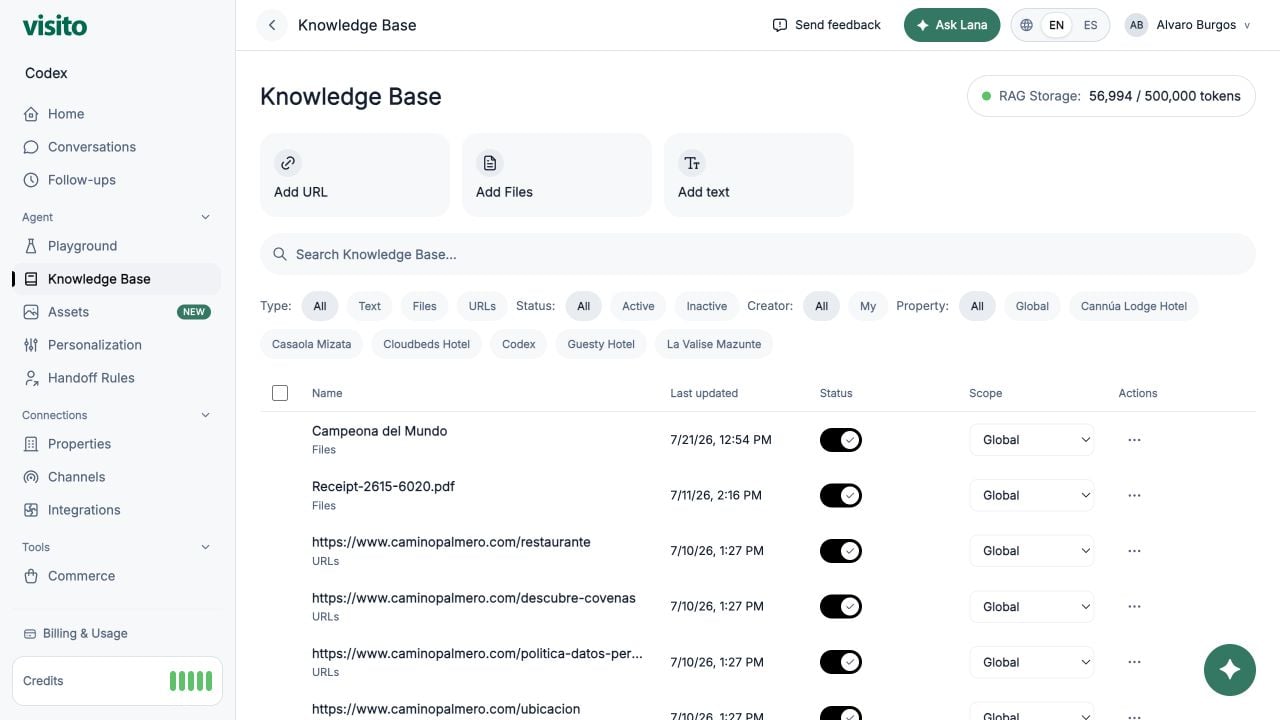
Review source types, filters, property scope, activation, and storage usage.
## What belongs where
| Content | Put it in |
| -------------------------------------------------------------------- | ------------------- |
| Check-in time, parking policy, amenities, fees, and room information | Knowledge Base |
| Tone, response format, and conversational behavior | Custom Instructions |
| Conditions that require a person | Handoff Rules |
| Menus, brochures, maps, and images the agent may send | Assets |
## Start with essential guest questions
Before adding sources, list the questions your team answers repeatedly. A useful first-property set is:
1. Check-in, check-out, and front-desk hours
2. Cancellation, deposit, and payment policies
3. Parking and transportation
4. Amenities and accessibility
5. Room types and occupancy details
6. Breakfast, restaurant, and room-service information
7. Pet, smoking, visitor, and child policies
8. Early check-in and late check-out
9. Directions and local recommendations
10. How to contact a person
Create a focused source for each topic rather than one large document called “Hotel information.”
## Add a focused text source
Go to **Agent → Knowledge Base** and select **Add text**.
Name the source after the topic, such as **Early check-in policy — Ocean View Hotel**.
Include the policy, applicable times or prices, exceptions, and what requires team confirmation.
Select the relevant property. Use Global only when the information is identical across the workspace.
Start a new Playground chat and ask the same question in several natural ways.
### Copy-ready example
Replace the bracketed values with your actual policy:
```text theme={null}
Early check-in policy
Standard check-in begins at [3:00 PM].
Guests may request early check-in from [11:00 AM].
The early check-in fee is [USD 35].
Early check-in is subject to availability and is not confirmed until the front desk approves it.
```
This source works because it separates facts from conditions and does not let the agent turn a request into a guarantee. Configure any required escalation separately in Handoff Rules.
## Prefer precise language
| Avoid | Prefer |
| ---------------------------------------- | ----------------------------------------------------------------------------------- |
| “Breakfast is available in the morning.” | “Breakfast is served daily from 7:00 AM to 10:30 AM in the lobby restaurant.” |
| “Parking may cost extra.” | “Self-parking costs USD 20 per vehicle, per night. Valet parking is not available.” |
| “We are pet friendly.” | “Dogs up to 20 kg are allowed. The fee is USD 30 per stay. Cats are not permitted.” |
| “Contact reception for details.” | State the known policy first, then explain which part requires reception. |
## Choose the right source type
* **Manual text** — best for policies, temporary notices, exceptions, and concise facts your team maintains directly.
* **Single URL** — best for one authoritative, frequently updated public page.
* **Website crawl** — useful for broad initial coverage, followed by review and cleanup.
* **Files** — useful for structured reference material the agent should read but not send directly.
A website crawl can import outdated, duplicated, or marketing-focused content. Review the resulting coverage and add precise manual sources for important policies.
## Scope multi-property knowledge
Use Global only for facts that truly apply everywhere, such as a company-wide loyalty program. Scope operational facts to a property when addresses, hours, amenities, fees, or policies differ.
For example, create:
* **Parking — Downtown Hotel**
* **Parking — Airport Hotel**
Do not create one Global parking source containing conflicting rules for both properties unless the text clearly identifies each property.
## Test retrieval
In a new Playground chat, ask:
* The exact FAQ: “What time is check-in?”
* A paraphrase: “How early can I get my room?”
* A question with missing property context
* A question containing an incorrect assumption
* A related question the source should not answer
The agent should use the correct property, avoid inventing missing details, and ask for clarification when the property is ambiguous.
## Maintain the Knowledge Base
* Assign an owner for each policy area.
* Include dates in time-sensitive source titles.
* Deactivate expired information immediately.
* Review top conversation questions monthly.
* Search for overlapping sources before adding a new one.
* Retest affected questions after every material change.
Review source types, filters, property scope, activation, and storage usage.