> ## Documentation Index
> Fetch the complete documentation index at: https://docs.visitoai.com/llms.txt
> Use this file to discover all available pages before exploring further.
# How to connect hotel messaging channels to Visito
> Connect WhatsApp, Instagram, Facebook Messenger, and Webchat to Visito, assign hotel properties, and control AI response behavior by channel.
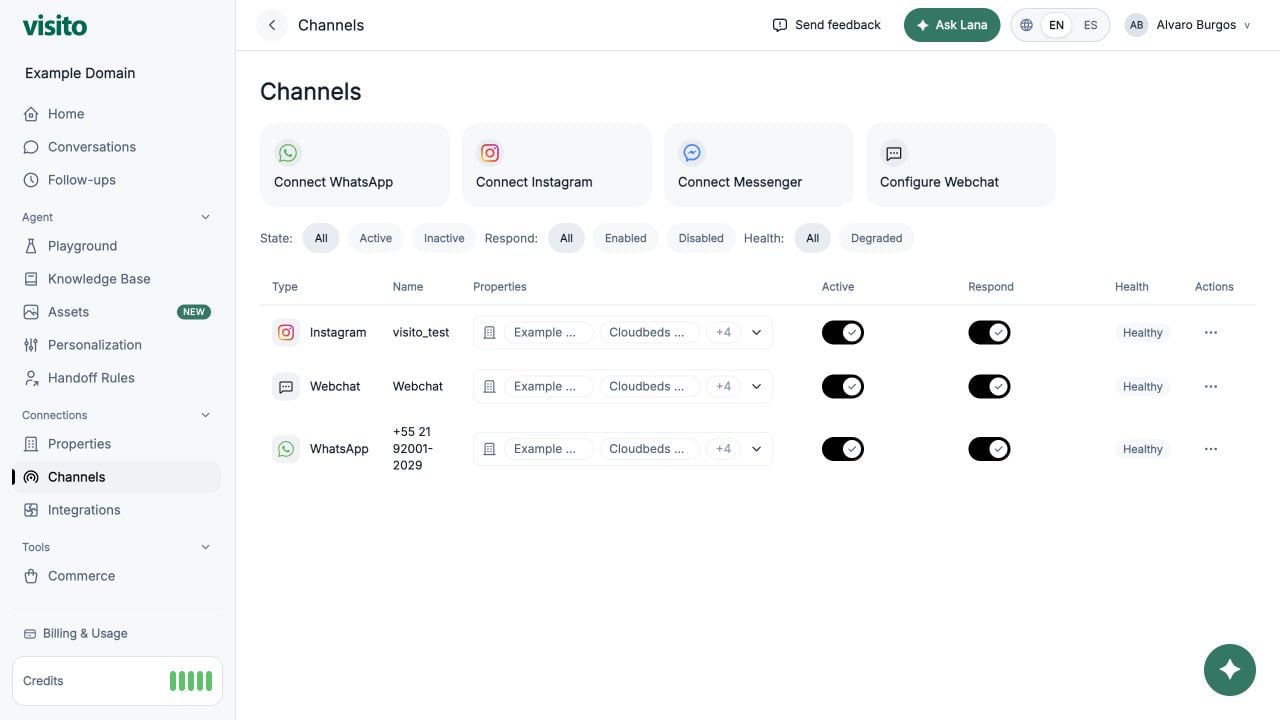
Open **Connections → Channels** to connect customer messaging surfaces and control how Visito responds.
 Choose the correct Meta setup path, complete the readiness checklist, and verify message routing.
## Supported channels
Connect a new number or an existing WhatsApp Business App number.
Connect a professional Instagram account through Meta authorization.
Connect one or more authorized Facebook Pages.
Share a public link or install and customize the website widget.
## Channel table
Use filters for:
* State: All, Active, or Inactive
* Respond: All, Enabled, or Disabled
* Health: All or Degraded
Each row shows channel type, name, property assignments, active state, response state, health, and actions.
## Property assignments
Select **Assign properties** in a row to choose which active properties use the channel. A channel can serve multiple properties.
## Active and Respond
* **Active** controls whether the channel connection is enabled.
* **Respond** controls whether the agent may respond on that channel.
Some connection states temporarily disable these controls until setup is complete.
## Connect WhatsApp
1. Select **Connect WhatsApp**.
2. Complete Meta Embedded Signup.
3. Select the phone numbers to connect.
4. Confirm the selection.
New-number and WhatsApp Business App coexistence flows are both supported. If coexistence is pending, finish setup in the WhatsApp Business App and use **Retry Activation** from row actions.
## Connect Instagram
1. Select **Connect Instagram**.
2. Complete Meta authorization with an account that has the required professional-account access.
3. Return to Visito and confirm the connected account appears.
## Connect Messenger
1. Select **Connect Messenger**.
2. Complete Meta authorization.
3. Select one or more Facebook Pages.
4. Confirm the selected pages.
## Disconnect
Open row actions and select **Disconnect**. Confirm the action. Disconnecting removes routing for that channel in the active workspace.
Confirm the active workspace and property assignments before connecting or disconnecting a channel.
Choose the correct Meta setup path, complete the readiness checklist, and verify message routing.
## Supported channels
Connect a new number or an existing WhatsApp Business App number.
Connect a professional Instagram account through Meta authorization.
Connect one or more authorized Facebook Pages.
Share a public link or install and customize the website widget.
## Channel table
Use filters for:
* State: All, Active, or Inactive
* Respond: All, Enabled, or Disabled
* Health: All or Degraded
Each row shows channel type, name, property assignments, active state, response state, health, and actions.
## Property assignments
Select **Assign properties** in a row to choose which active properties use the channel. A channel can serve multiple properties.
## Active and Respond
* **Active** controls whether the channel connection is enabled.
* **Respond** controls whether the agent may respond on that channel.
Some connection states temporarily disable these controls until setup is complete.
## Connect WhatsApp
1. Select **Connect WhatsApp**.
2. Complete Meta Embedded Signup.
3. Select the phone numbers to connect.
4. Confirm the selection.
New-number and WhatsApp Business App coexistence flows are both supported. If coexistence is pending, finish setup in the WhatsApp Business App and use **Retry Activation** from row actions.
## Connect Instagram
1. Select **Connect Instagram**.
2. Complete Meta authorization with an account that has the required professional-account access.
3. Return to Visito and confirm the connected account appears.
## Connect Messenger
1. Select **Connect Messenger**.
2. Complete Meta authorization.
3. Select one or more Facebook Pages.
4. Confirm the selected pages.
## Disconnect
Open row actions and select **Disconnect**. Confirm the action. Disconnecting removes routing for that channel in the active workspace.
Confirm the active workspace and property assignments before connecting or disconnecting a channel.