> ## Documentation Index
> Fetch the complete documentation index at: https://docs.visitoai.com/llms.txt
> Use this file to discover all available pages before exploring further.
# Example: add a custom integration with Lana
> Use Hostaway as a worked example, then adapt the same research, action setup, and Playground testing workflow to your own system.
Tell Lana what your customer-facing agent needs to do with another system. Lana can research the provider's public documentation, prepare supported actions in Visito, and test their responses with your approval.
This is a worked example of that workflow using **Hostaway availability and stay pricing**. Follow the same steps for your own use case: describe the outcome, review the proposed actions, arrange private credential entry, and check the result in Playground. Replace the provider, customer task, and test inputs with your own. You do not need to write the action schemas yourself.
## Before you start
* Select the intended business and sign in as a registered administrator with access to Lana.
* Have authorized API access to the external system. An administrator or support operator will need to enter its credentials privately.
* Start with a narrow test. The Hostaway example checks availability and quotes, without reservations, date blocking, or customer messages.
One integration often needs several actions. In this example:
| Action | What it does | What the agent needs |
| - | - | - |
| Availability | Finds apartments available for a stay and returns their IDs | Arrival, departure, number of guests |
| Stay pricing | Retrieves the total and charge breakdown for one returned apartment | Apartment ID and the same stay details |
The agent combines the results during the conversation. A listing's base price is not a quote for the requested stay.
## 1. Ask Lana to connect your system
Open **Lana**, start a chat, and describe the result in your own words. For example:
```text theme={null}
Hi Lana. I use Hostaway to manage my apartments and want to connect it to Visito.
I don't know how to code. I want our agent to tell guests which apartments are
available and what a stay costs for their dates and number of guests.
Help me set this up for testing only. Do not create reservations, block dates,
or send messages to customers.
```
You can name the system without supplying a documentation URL. Ask Lana to use official sources and explain anything it cannot verify. If you have a specific API version or documentation link, include it.
Lana reviews your business configuration and the provider documentation to identify the connection options. You can ask it to check whether a direct connection fits your workflow:
```text theme={null}
We are starting from scratch and do not have an intermediary service.
Can you check whether Visito's existing custom actions can connect directly?
Explain what is supported and what help you still need from us.
Keep everything limited to availability and pricing tests.
```
Lana can explain which requests map to Visito actions and whether your workflow needs an adapter or additional technical work.
## 2. Review the proposed actions
Lana prepares the actions and asks you to approve each configuration change. Review the selected business, purpose, destination, inputs, and intended effects. For this example, both actions should be **read only** and initially **Off** while authentication is missing.
The example uses the action names `hostaway_disponibilidad_prueba` and `hostaway_precio_prueba`. Your names can differ. Confirm that the availability action passes real returned apartment IDs to pricing and that both use the same dates and guest count.
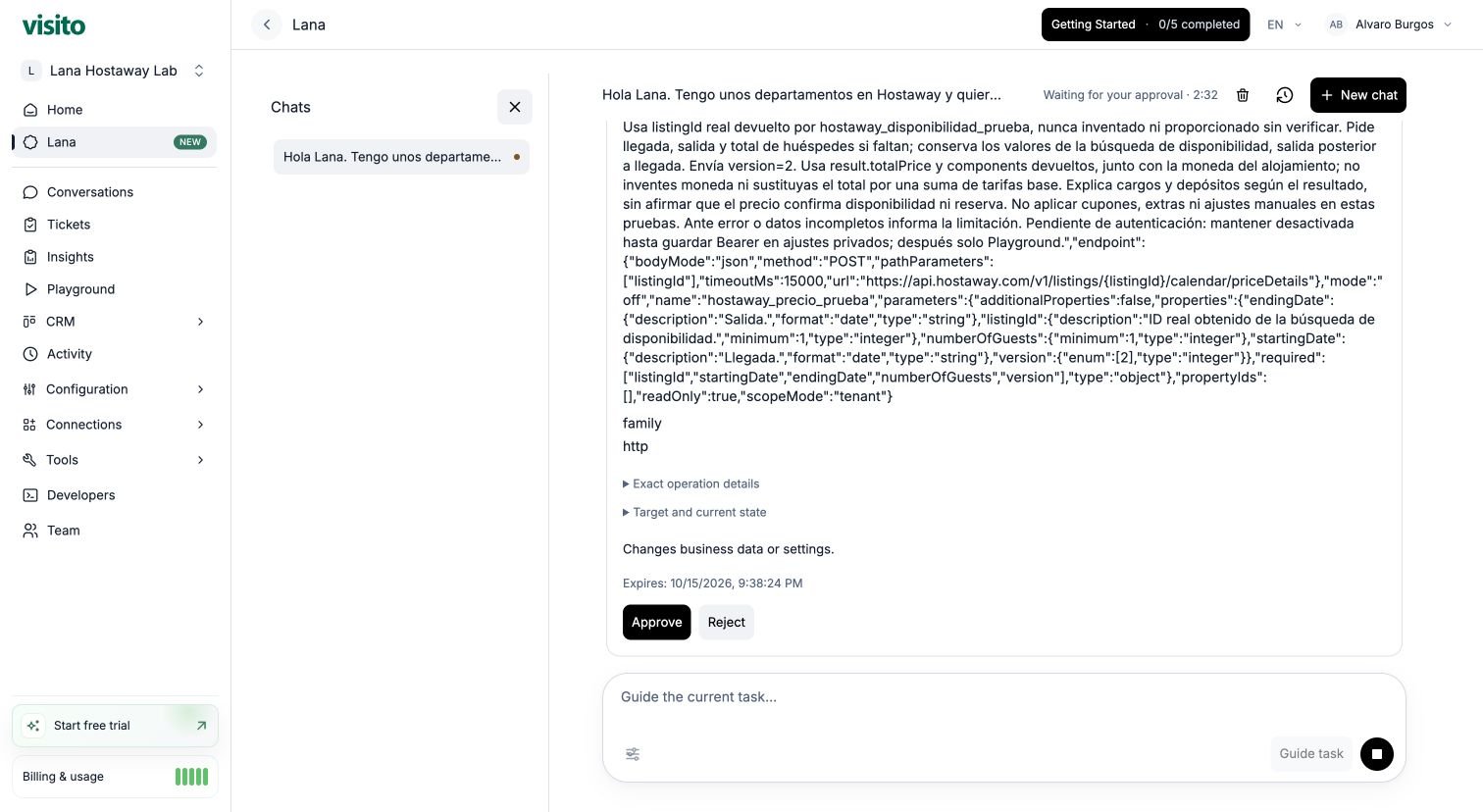 Select **Reject** if a proposal needs changing. Approving one action does not approve the next action or a later provider test. A saved configuration is not yet proof that the connection works.
## 3. Add credentials through private settings
Keep passwords, API keys, and access tokens out of the Lana chat, action instructions, and input schema.
An authorized administrator or support operator must obtain the appropriate provider access token and save it in the action's private **Authentication** settings. Follow the provider's access process: an API key and an access token are not necessarily interchangeable. For bearer authentication in the HTTP action editor, enter the token without the `Bearer ` prefix.
Save the access token in the private authentication settings of both actions. If you need help obtaining the token or configuring authentication, contact your administrator or Visito Support.
After saving authentication, return to the same chat:
```text theme={null}
The Hostaway access token is now saved in the private authentication settings
for both actions. Enable them for Playground only and test November 1–3, 2026,
for 2 guests. Find the first two available apartments and retrieve the total
stay price for each. Do not create reservations or send customer messages.
```
Use future dates appropriate to your own test. Lana can verify whether authentication is configured without receiving the token in the chat.
## 4. Approve the provider tests
Lana proposes **Playground only** activation and each external action test separately. Review the action, dates, guests, and apartment ID before approving.
Playground-only actions still contact the real provider. In this walkthrough, the approved requests retrieve availability and calculate quotes. They do not reserve an apartment.
Ask Lana to summarize the availability response, identify the returned apartment IDs, and use those IDs for pricing. If a response is incomplete or clipped, ask it to inspect the saved execution and diagnostic before proposing another request.
Select **Reject** if a proposal needs changing. Approving one action does not approve the next action or a later provider test. A saved configuration is not yet proof that the connection works.
## 3. Add credentials through private settings
Keep passwords, API keys, and access tokens out of the Lana chat, action instructions, and input schema.
An authorized administrator or support operator must obtain the appropriate provider access token and save it in the action's private **Authentication** settings. Follow the provider's access process: an API key and an access token are not necessarily interchangeable. For bearer authentication in the HTTP action editor, enter the token without the `Bearer ` prefix.
Save the access token in the private authentication settings of both actions. If you need help obtaining the token or configuring authentication, contact your administrator or Visito Support.
After saving authentication, return to the same chat:
```text theme={null}
The Hostaway access token is now saved in the private authentication settings
for both actions. Enable them for Playground only and test November 1–3, 2026,
for 2 guests. Find the first two available apartments and retrieve the total
stay price for each. Do not create reservations or send customer messages.
```
Use future dates appropriate to your own test. Lana can verify whether authentication is configured without receiving the token in the chat.
## 4. Approve the provider tests
Lana proposes **Playground only** activation and each external action test separately. Review the action, dates, guests, and apartment ID before approving.
Playground-only actions still contact the real provider. In this walkthrough, the approved requests retrieve availability and calculate quotes. They do not reserve an apartment.
Ask Lana to summarize the availability response, identify the returned apartment IDs, and use those IDs for pricing. If a response is incomplete or clipped, ask it to inspect the saved execution and diagnostic before proposing another request.
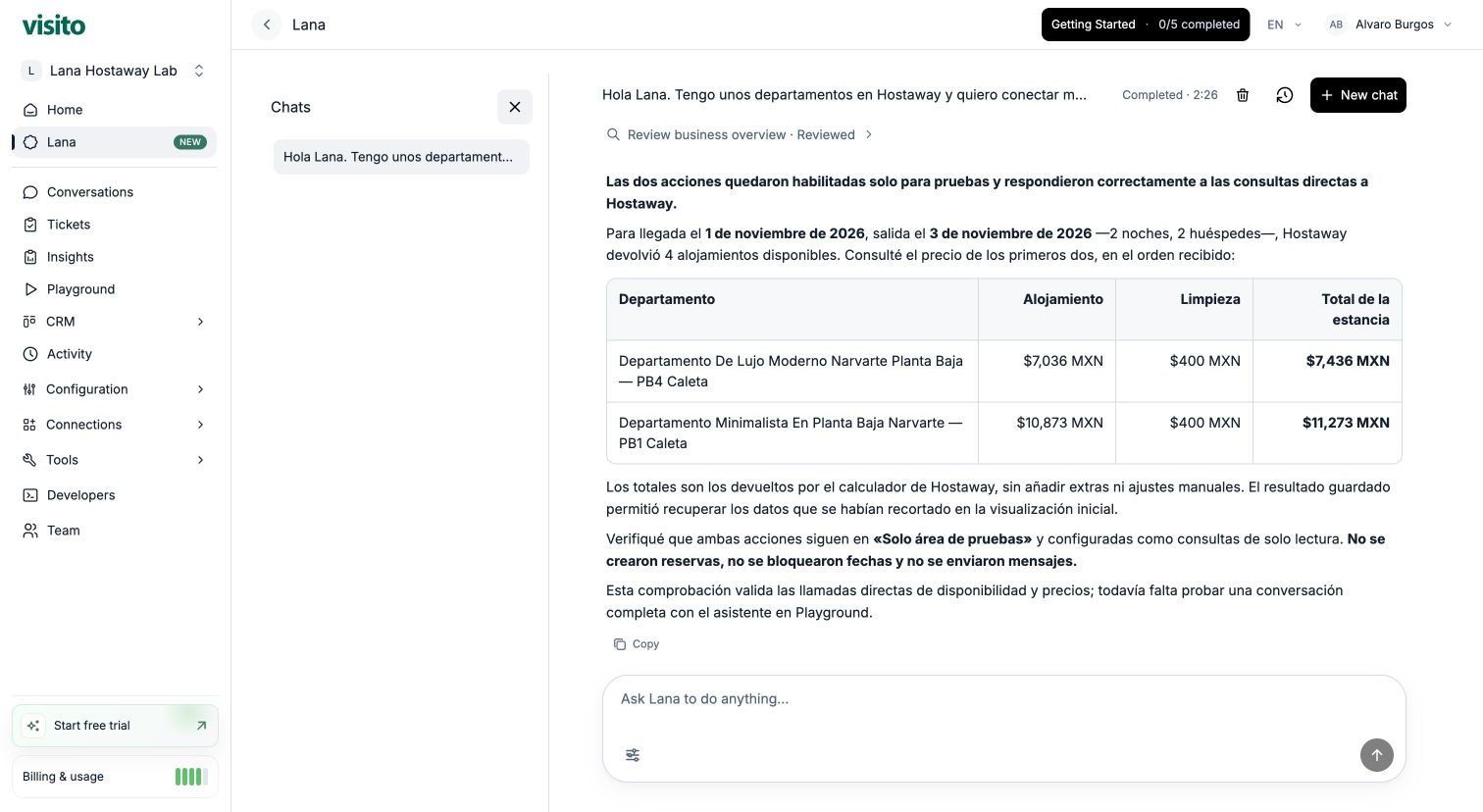 Review the availability and pricing results, including any missing information or errors. Once the actions return the expected results, check the full guest conversation in Playground.
## 5. Test the guest conversation in Playground
Open **Playground** for the same business to check how your agent uses the actions during a conversation.
Start without stay details:
```text theme={null}
Hi, which apartments do you have available, and how much would a stay cost?
```
The agent should ask for arrival, departure, and number of guests before consulting Hostaway. Then send:
```text theme={null}
November 1–3, 2026, for 2 guests. Show me the first two available apartments
and the total for each stay, including the returned charges.
```
Check the availability and pricing receipts and compare them with the answer. Here is an example quote for two nights:
| Apartment | Accommodation | Cleaning | Stay total |
| - | -: | -: | -: |
| De Lujo Moderno Narvarte Planta Baja | MXN 7,036 | MXN 400 | **MXN 7,436** |
| Minimalista En Planta Baja Narvarte | MXN 10,873 | MXN 400 | **MXN 11,273** |
Review the availability and pricing results, including any missing information or errors. Once the actions return the expected results, check the full guest conversation in Playground.
## 5. Test the guest conversation in Playground
Open **Playground** for the same business to check how your agent uses the actions during a conversation.
Start without stay details:
```text theme={null}
Hi, which apartments do you have available, and how much would a stay cost?
```
The agent should ask for arrival, departure, and number of guests before consulting Hostaway. Then send:
```text theme={null}
November 1–3, 2026, for 2 guests. Show me the first two available apartments
and the total for each stay, including the returned charges.
```
Check the availability and pricing receipts and compare them with the answer. Here is an example quote for two nights:
| Apartment | Accommodation | Cleaning | Stay total |
| - | -: | -: | -: |
| De Lujo Moderno Narvarte Planta Baja | MXN 7,036 | MXN 400 | **MXN 7,436** |
| Minimalista En Planta Baja Narvarte | MXN 10,873 | MXN 400 | **MXN 11,273** |
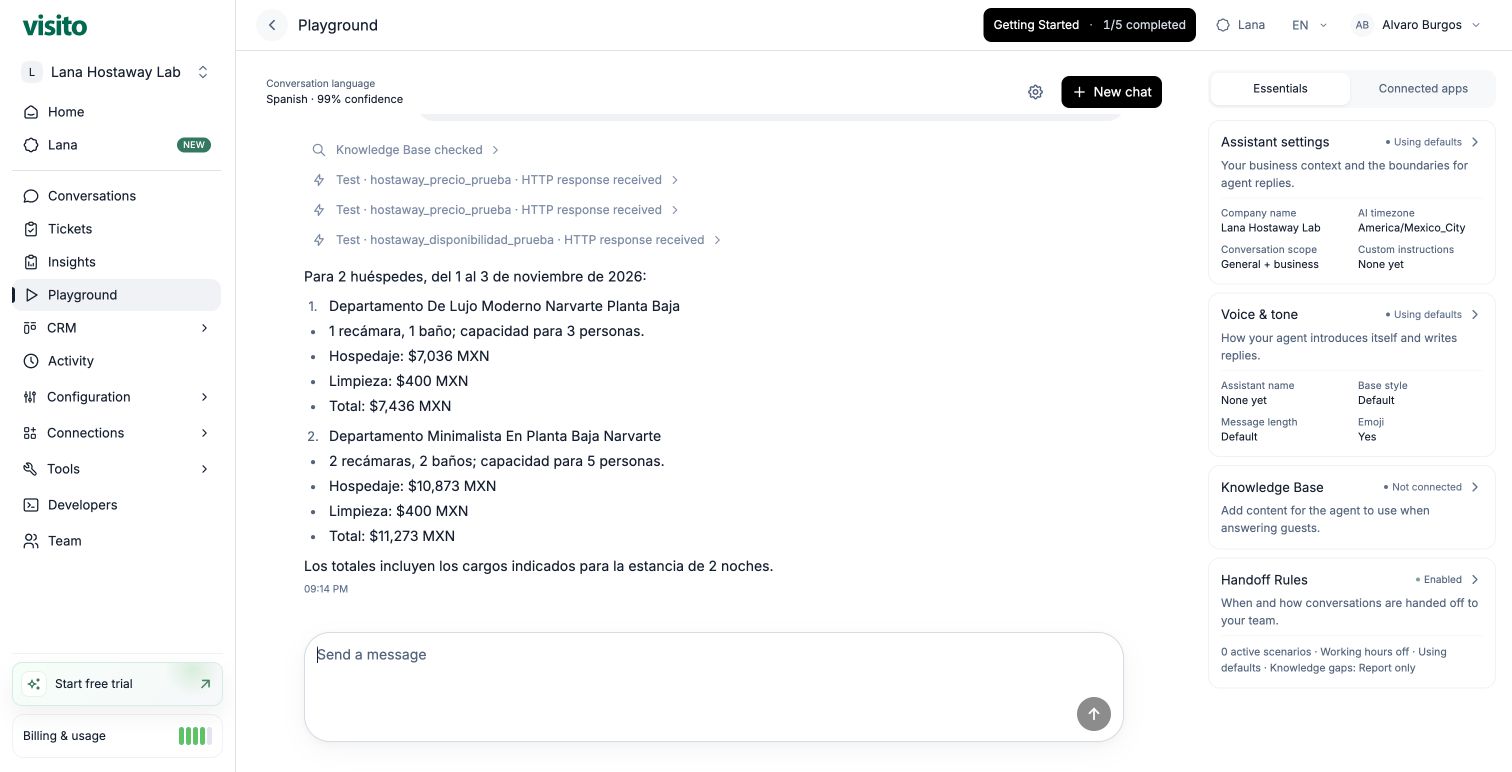 These sample prices illustrate the response. Availability and prices depend on the requested dates, guest count, and current Hostaway rates. Availability and pricing queries do not create a reservation.
## 6. Change the stay details
Check that the agent obtains fresh results rather than repeating the earlier quote:
```text theme={null}
Instead, November 10–13, 2026, for 3 guests. Are those same two apartments
still available, and what is the new total for each stay?
```
The agent should check availability again and request new prices for the same apartment IDs. In this example, the updated totals are **MXN 6,700** and **MXN 9,451**, including the returned additional-guest and cleaning charges.
These sample prices illustrate the response. Availability and prices depend on the requested dates, guest count, and current Hostaway rates. Availability and pricing queries do not create a reservation.
## 6. Change the stay details
Check that the agent obtains fresh results rather than repeating the earlier quote:
```text theme={null}
Instead, November 10–13, 2026, for 3 guests. Are those same two apartments
still available, and what is the new total for each stay?
```
The agent should check availability again and request new prices for the same apartment IDs. In this example, the updated totals are **MXN 6,700** and **MXN 9,451**, including the returned additional-guest and cleaning charges.
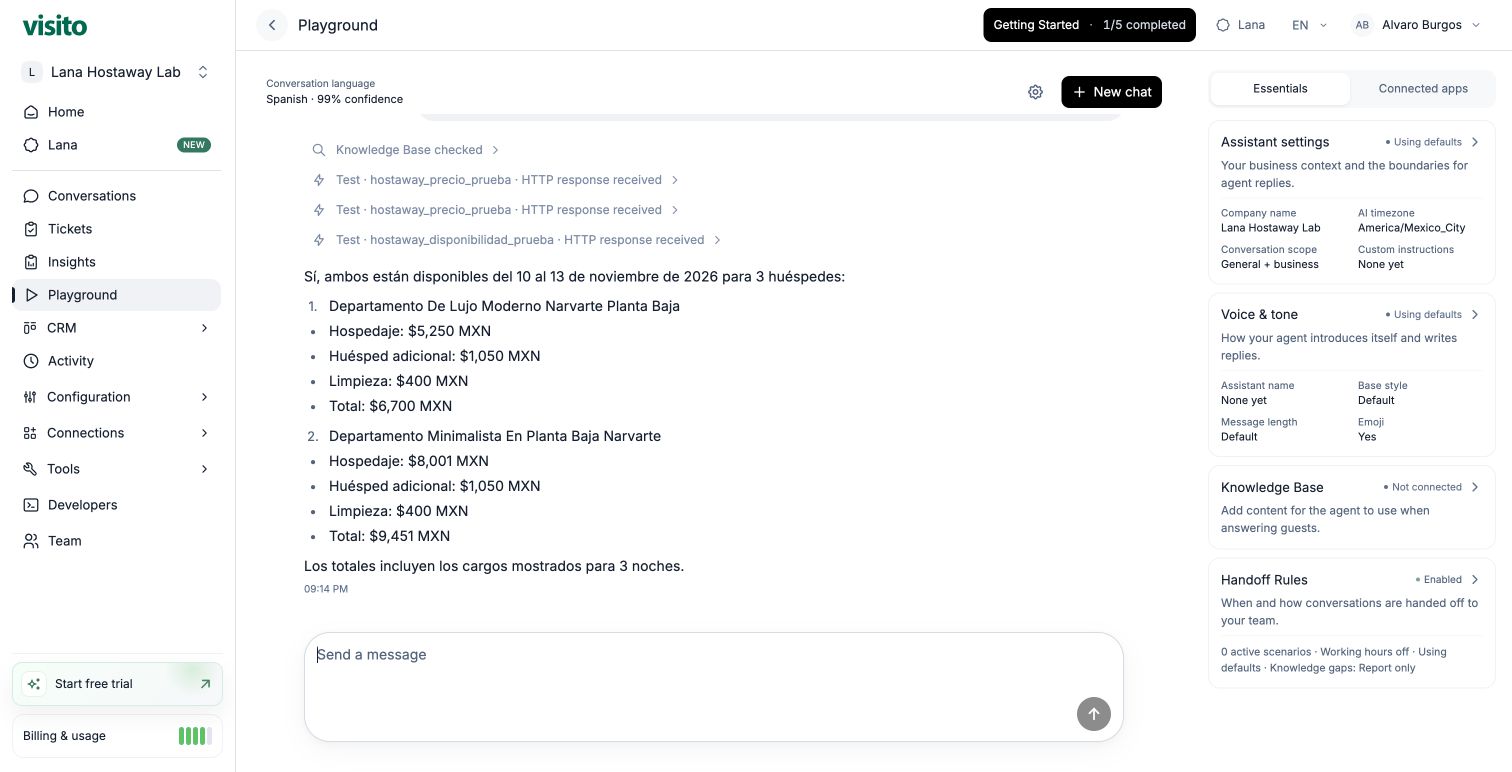 Compare the new answer with the latest action results. Confirm that each displayed total uses the correct apartment, dates, guest count, currency, and included charges.
## If something does not work
| What you see | What to do |
| - | - |
| Authentication is missing or rejected | Check the private authentication settings and token with an authorized administrator or support operator. Do not paste credentials into chat. |
| The action is saved but never called | Check its mode, business scope, purpose, and required inputs. Ask Lana to inspect its current configuration. |
| A flat listing price appears instead of a stay total | Ask Lana to inspect the saved availability and pricing calls and verify that the answer uses the quote for the same apartment, dates, and guests. |
| A response is clipped or a request fails | Ask Lana to inspect the saved execution and diagnostic, state what is missing, and propose the next step. An API error does not mean there is no availability. |
Keep the actions **Playground only** while you review the answers. When you are ready, confirm their business scope and switch them to **Active** for use in customer conversations. Choose **Off** to pause future calls.
## Adapt the example to your own workflow
Start with this prompt and replace the bracketed details:
```text theme={null}
I use [system] and want our Visito agent to [customer task].
Research the official documentation and check our current Visito configuration.
Explain which actions we need, how they work together, and which credentials
must be entered privately. Prepare them for Playground testing and ask for
approval before each configuration change or external test.
Use [sample inputs] and check the answer against the action results.
Do not make bookings, purchases, or send customer messages during this test.
```
Use the customer task to decide which actions to ask Lana to investigate:
| Use case | Actions to investigate | What to vary in Playground |
| - | - | - |
| Appointments | Find appointment types and available time slots | Service, date, time zone, and duration |
| Inventory and prices | Find the product, check stock, and retrieve its price | Product variant, quantity, and location |
| Order status | Find the authorized customer's order and retrieve its status | Order reference and customer details |
As with the Hostaway example, pass the IDs returned by one action into the next and keep shared inputs consistent. Test missing information first, then a complete request, then changed inputs. Compare each answer with the latest action results before activating the workflow.
The provider needs an API and an access method Visito supports. Each workflow has its own actions and access requirements; the two Hostaway actions are specific to this example. Ask Lana to explain the proposed connection and whether it needs additional actions, an adapter, or technical assistance.
Review access, approvals, progress, downloads, and credits.
Learn how to inspect the guest conversation and its recorded results in Playground.
This documentation is built and hosted on [Mintlify](https://mintlify.com), a developer documentation platform.
Compare the new answer with the latest action results. Confirm that each displayed total uses the correct apartment, dates, guest count, currency, and included charges.
## If something does not work
| What you see | What to do |
| - | - |
| Authentication is missing or rejected | Check the private authentication settings and token with an authorized administrator or support operator. Do not paste credentials into chat. |
| The action is saved but never called | Check its mode, business scope, purpose, and required inputs. Ask Lana to inspect its current configuration. |
| A flat listing price appears instead of a stay total | Ask Lana to inspect the saved availability and pricing calls and verify that the answer uses the quote for the same apartment, dates, and guests. |
| A response is clipped or a request fails | Ask Lana to inspect the saved execution and diagnostic, state what is missing, and propose the next step. An API error does not mean there is no availability. |
Keep the actions **Playground only** while you review the answers. When you are ready, confirm their business scope and switch them to **Active** for use in customer conversations. Choose **Off** to pause future calls.
## Adapt the example to your own workflow
Start with this prompt and replace the bracketed details:
```text theme={null}
I use [system] and want our Visito agent to [customer task].
Research the official documentation and check our current Visito configuration.
Explain which actions we need, how they work together, and which credentials
must be entered privately. Prepare them for Playground testing and ask for
approval before each configuration change or external test.
Use [sample inputs] and check the answer against the action results.
Do not make bookings, purchases, or send customer messages during this test.
```
Use the customer task to decide which actions to ask Lana to investigate:
| Use case | Actions to investigate | What to vary in Playground |
| - | - | - |
| Appointments | Find appointment types and available time slots | Service, date, time zone, and duration |
| Inventory and prices | Find the product, check stock, and retrieve its price | Product variant, quantity, and location |
| Order status | Find the authorized customer's order and retrieve its status | Order reference and customer details |
As with the Hostaway example, pass the IDs returned by one action into the next and keep shared inputs consistent. Test missing information first, then a complete request, then changed inputs. Compare each answer with the latest action results before activating the workflow.
The provider needs an API and an access method Visito supports. Each workflow has its own actions and access requirements; the two Hostaway actions are specific to this example. Ask Lana to explain the proposed connection and whether it needs additional actions, an adapter, or technical assistance.
Review access, approvals, progress, downloads, and credits.
Learn how to inspect the guest conversation and its recorded results in Playground.
This documentation is built and hosted on [Mintlify](https://mintlify.com), a developer documentation platform.