> ## Documentation Index
> Fetch the complete documentation index at: https://docs.visitoai.com/llms.txt
> Use this file to discover all available pages before exploring further.
# Manage webhooks
> Create an endpoint, verify signed events, test with ngrok, and investigate delivery attempts from Developers → Webhooks.
Webhooks notify your application when supported events happen in your Visito workspace. Open **Developers → Webhooks** as a workspace admin. You use your dashboard login; you do **not** need an API key to create or manage endpoints here.
This guide covers M2M subscriptions. A **Capture Data** action's webhook is configured separately under Actions.
The screenshots show a controlled local test with synthetic identifiers. Replace the example ngrok address with your own. No customer conversation was created or replayed for these tests.
## Before you start
You need admin access, a receiver you control, and a public HTTPS address on port 443. `localhost:3000`, HTTP URLs, private addresses, and IPv6-only destinations are not supported. Use an HTTPS tunnel for local development.
If the page reports missing signing configuration, an unavailable worker, or delivery not enabled for the workspace, contact your Visito administrator. An **Enabled** endpoint describes its configuration; it does not prove delivery is operational. Creating an endpoint requires compatible worker and signing configuration; sending a test additionally requires workspace delivery enrollment.
## 1. Start a local receiver
The [complete Python example](https://github.com/visito-ai/visito-docs/tree/main/examples/webhook-receiver) verifies the signature against the exact request bytes, checks the timestamp, durably stores accepted events in SQLite, and deduplicates by event ID. Use Python 3.10 or later. It uses only the standard library.
From the example directory:
```bash theme={null}
python3 -m venv .venv
source .venv/bin/activate
WEBHOOK_SECRET_FILE=./webhook-secret.txt \
WEBHOOK_DB=./webhook-events.sqlite3 \
WEBHOOK_FAIL_FIRST=1 python3 server.py
```
Leave this running. Until you save the signing secret, it returns `503`. `WEBHOOK_FAIL_FIRST=1` intentionally returns `503` for the first correctly signed request for each event, then accepts its retry. Omit it for normal acceptance.
In another terminal, start your already configured ngrok client:
```bash theme={null}
ngrok http 8765
```
Copy the public **HTTPS** forwarding address. If you have a reserved ngrok domain, use `ngrok http 8765 --url=YOUR-DOMAIN`. Your webhook destination is:
```text theme={null}
https://YOUR-DOMAIN/webhooks/visito
```
Keep both processes running while testing. Your computer, receiver, and tunnel must all remain available. This small, single-process receiver is a development example; production receivers need managed hosting, bounded processing, monitoring, and durable downstream work.
## 2. Create the webhook
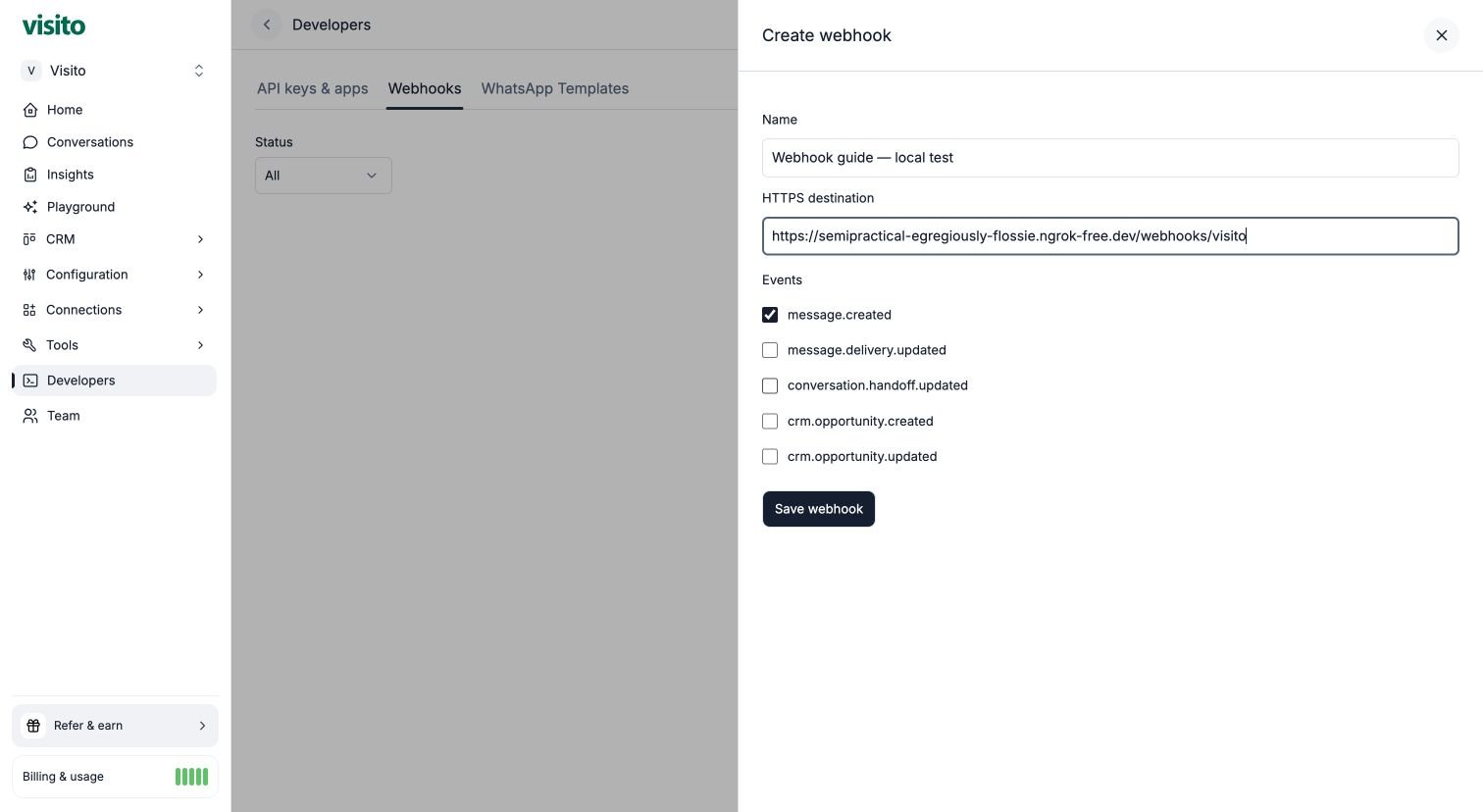
1. In the correct workspace, open **Developers → Webhooks** and select **Create webhook**.
2. Enter a recognizable **Name** and your full **HTTPS destination**, including `/webhooks/visito` for this example.
3. Select the events your application needs. For this walkthrough, select only `message.created`.
4. Select **Save webhook**.
5. Copy the signing secret immediately and store it securely. It is shown only once. There is no API-key selector.
 Save the secret locally without putting it into command history:
```bash theme={null}
python3 - <<'PY'
import getpass, os
from pathlib import Path
secret = getpass.getpass("Paste webhook signing secret: ").strip()
if not secret:
raise SystemExit("No secret entered")
path = Path("webhook-secret.txt")
fd = os.open(path, os.O_WRONLY | os.O_CREAT | os.O_TRUNC, 0o600)
with os.fdopen(fd, "w") as out:
out.write(secret)
os.chmod(path, 0o600)
print("Signing secret saved")
PY
```
Run that command in the example directory. The receiver reads this file for each request, so no restart is needed. Never commit the file or include secrets in screenshots, tickets, request URLs, or application logs. The secret verifies webhook deliveries; it is not a Visito API access token.
### Available events
| Event | What it represents |
| - | - |
| `message.created` | A supported message was created. Check `data.direction` before acting on inbound messages. |
| `message.delivery.updated` | A message delivery status changed. |
| `conversation.handoff.updated` | A conversation handoff changed. |
| `crm.opportunity.created` | A CRM opportunity was created. |
| `crm.opportunity.updated` | A CRM opportunity changed. |
Real events contain metadata, such as resource IDs and state changes, rather than conversation bodies. Use the [scoped API](/api-docs/webhooks) if your integration also needs resource content. Internal system/tool turns and Playground messages are excluded.
## 3. Send a test event
Open the saved endpoint, select **Send test event**, choose one of its subscribed event types, and review the payload and destination. Select **Confirm** once.
Save the secret locally without putting it into command history:
```bash theme={null}
python3 - <<'PY'
import getpass, os
from pathlib import Path
secret = getpass.getpass("Paste webhook signing secret: ").strip()
if not secret:
raise SystemExit("No secret entered")
path = Path("webhook-secret.txt")
fd = os.open(path, os.O_WRONLY | os.O_CREAT | os.O_TRUNC, 0o600)
with os.fdopen(fd, "w") as out:
out.write(secret)
os.chmod(path, 0o600)
print("Signing secret saved")
PY
```
Run that command in the example directory. The receiver reads this file for each request, so no restart is needed. Never commit the file or include secrets in screenshots, tickets, request URLs, or application logs. The secret verifies webhook deliveries; it is not a Visito API access token.
### Available events
| Event | What it represents |
| - | - |
| `message.created` | A supported message was created. Check `data.direction` before acting on inbound messages. |
| `message.delivery.updated` | A message delivery status changed. |
| `conversation.handoff.updated` | A conversation handoff changed. |
| `crm.opportunity.created` | A CRM opportunity was created. |
| `crm.opportunity.updated` | A CRM opportunity changed. |
Real events contain metadata, such as resource IDs and state changes, rather than conversation bodies. Use the [scoped API](/api-docs/webhooks) if your integration also needs resource content. Internal system/tool turns and Playground messages are excluded.
## 3. Send a test event
Open the saved endpoint, select **Send test event**, choose one of its subscribed event types, and review the payload and destination. Select **Confirm** once.
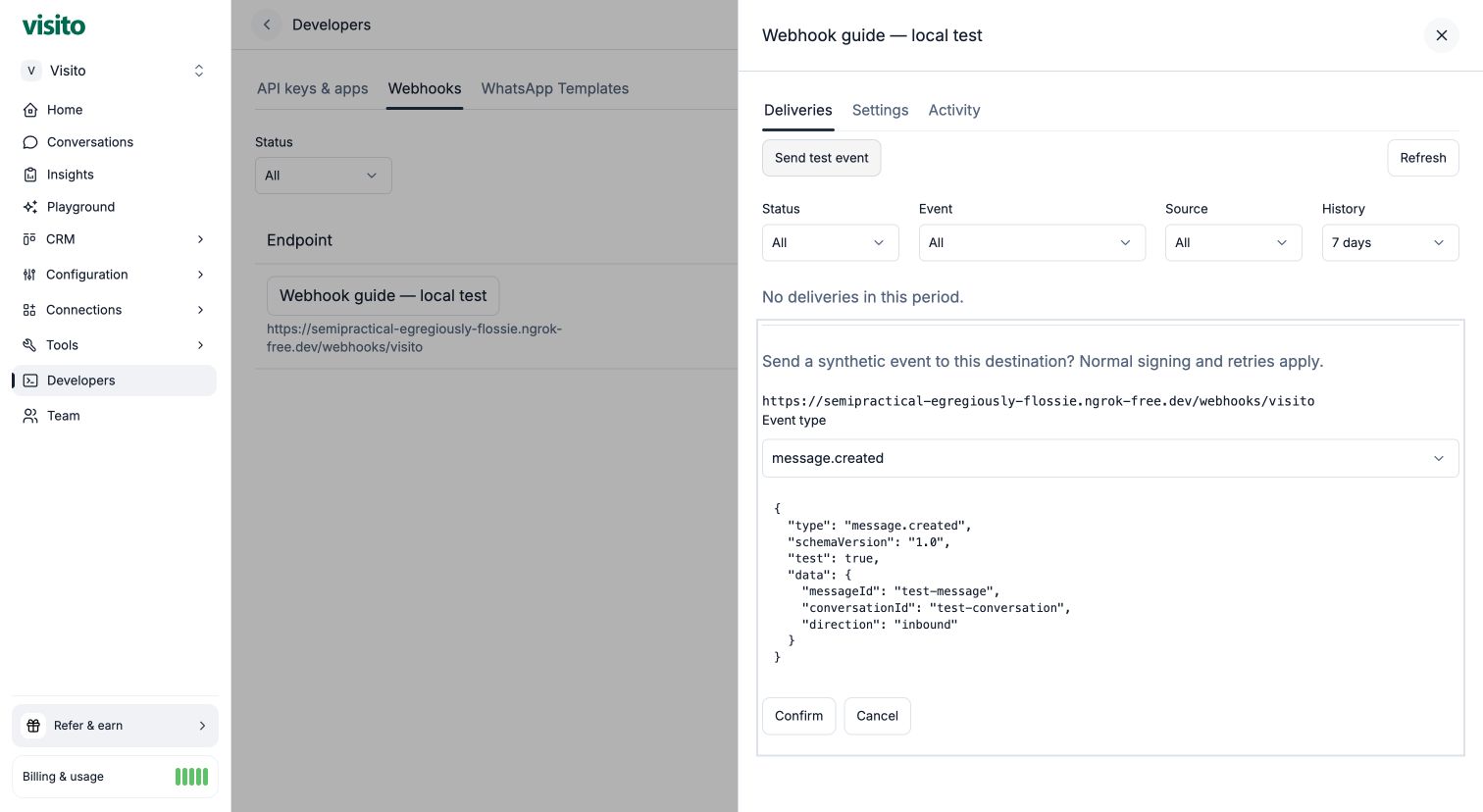 Test events use the normal signing, durable queue, timeout, and retry paths. They keep `schemaVersion: "1.0"` and add `test: true`. Resource identifiers are synthetic; the test creates no message, conversation, or CRM business record. Your receiver still receives a real HTTPS request, so have it route test events away from business actions.
Tests require an active, authorized endpoint and a ready worker. The limit is **one test per endpoint per minute**. The dashboard supplies an idempotency key to avoid duplicate creation from the same request. Wait for the result rather than repeatedly clicking Confirm.
## 4. Inspect delivery and attempts
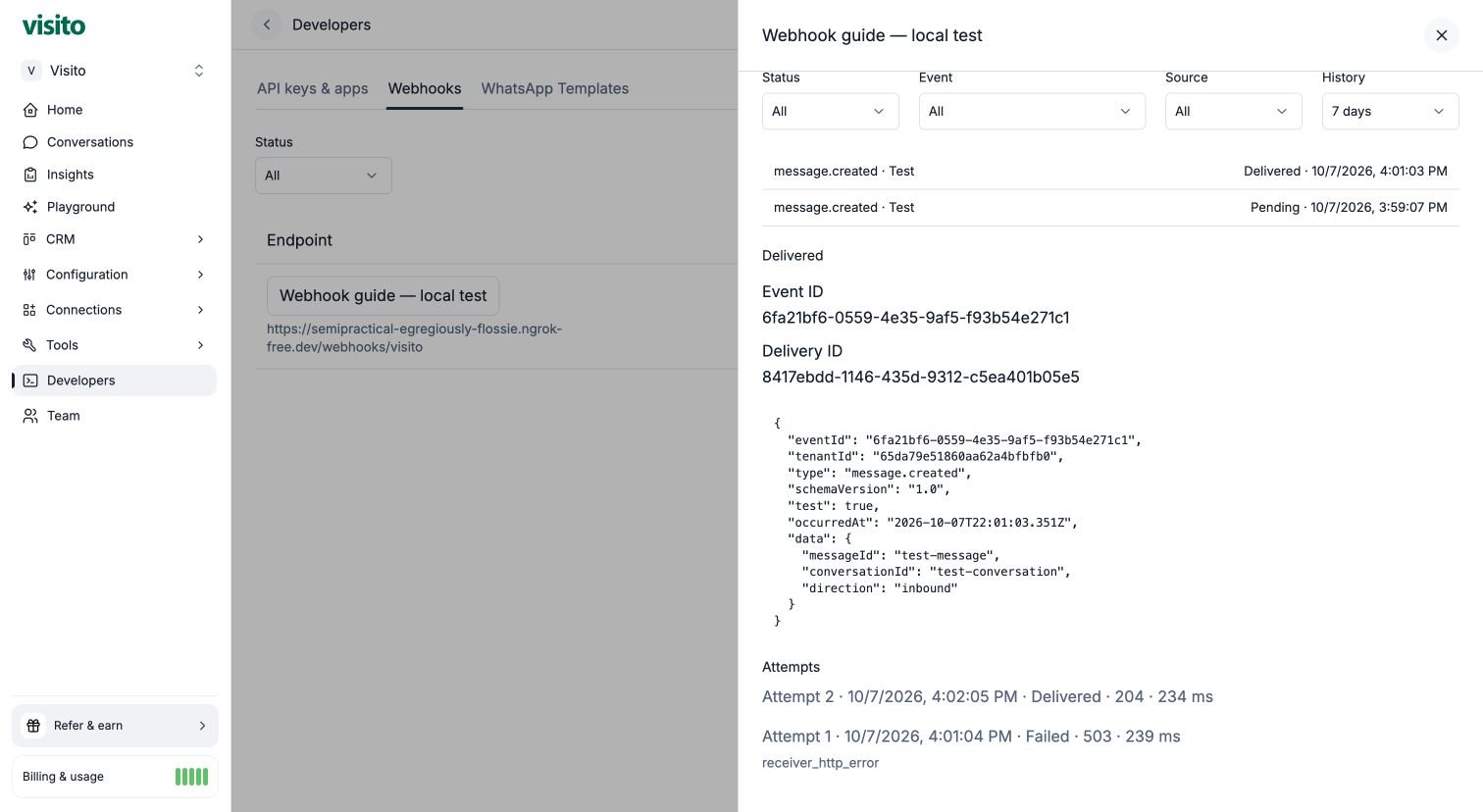
In **Deliveries**, select the test. The detail includes its event ID, delivery ID, JSON payload, state, next retry when applicable, and individual attempts. Filter by status, event, Test/Real, and history. The default is seven days, with choices up to 30 days.
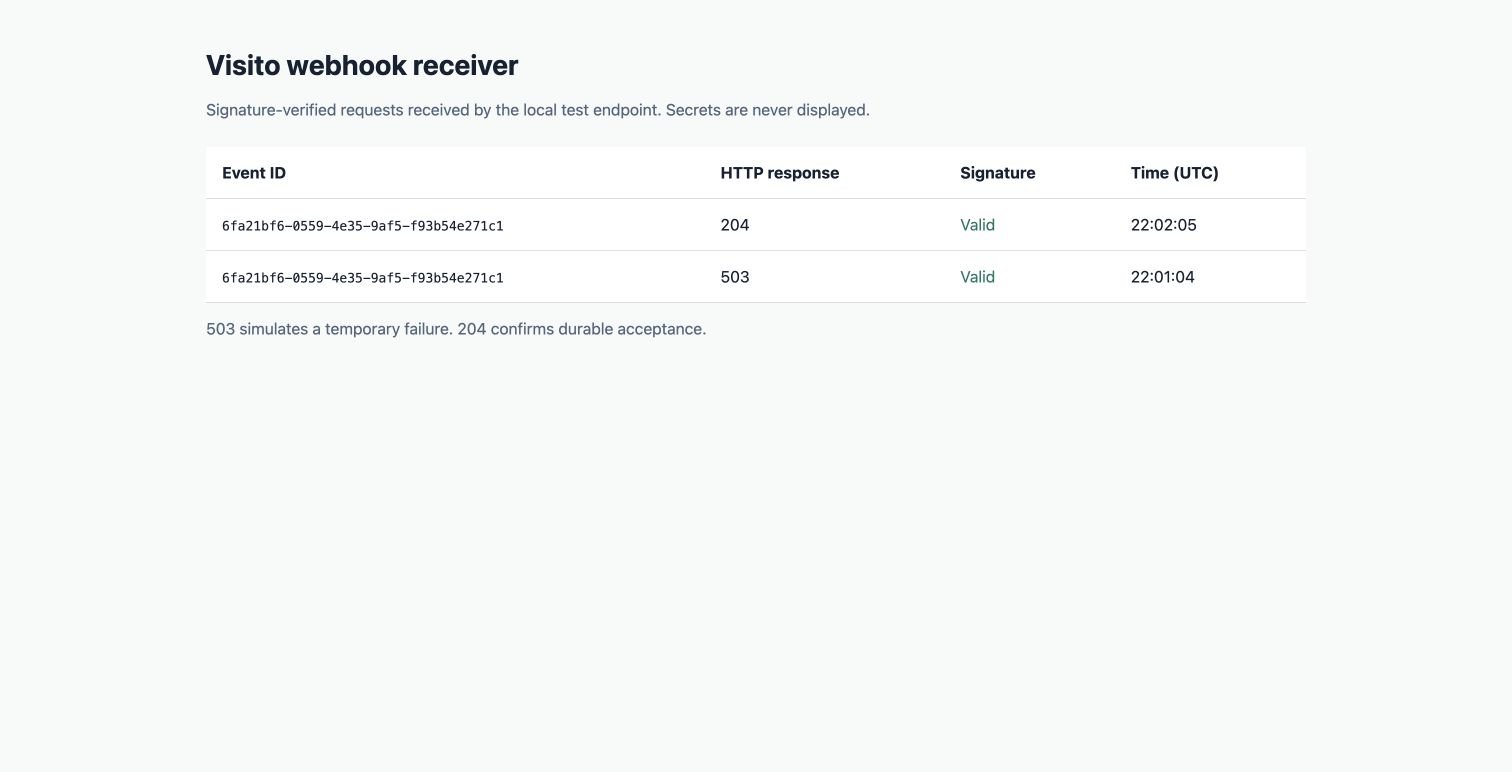
In this walkthrough, attempt 1 returns `503` deliberately. The delivery remains **Pending**, and Visito schedules the next attempt after about one minute. Once that retry receives `204`, the delivery becomes **Delivered**. Both attempts share the same event ID.
Test events use the normal signing, durable queue, timeout, and retry paths. They keep `schemaVersion: "1.0"` and add `test: true`. Resource identifiers are synthetic; the test creates no message, conversation, or CRM business record. Your receiver still receives a real HTTPS request, so have it route test events away from business actions.
Tests require an active, authorized endpoint and a ready worker. The limit is **one test per endpoint per minute**. The dashboard supplies an idempotency key to avoid duplicate creation from the same request. Wait for the result rather than repeatedly clicking Confirm.
## 4. Inspect delivery and attempts
In **Deliveries**, select the test. The detail includes its event ID, delivery ID, JSON payload, state, next retry when applicable, and individual attempts. Filter by status, event, Test/Real, and history. The default is seven days, with choices up to 30 days.
In this walkthrough, attempt 1 returns `503` deliberately. The delivery remains **Pending**, and Visito schedules the next attempt after about one minute. Once that retry receives `204`, the delivery becomes **Delivered**. Both attempts share the same event ID.
 Open `http://127.0.0.1:8765` locally to see the example receiver's signature checks. That diagnostic page is not served through the public ngrok hostname.
 | State | Meaning and next step |
| - | - |
| **Pending** | Waiting for initial delivery or a scheduled retry. Check **Next retry**. |
| **Sending** | A worker has claimed the delivery. An HTTP request may be in progress. |
| **Delivered** | The receiver returned 2xx. This confirms acceptance, not completion of your downstream business action. |
| **Failed** | Automatic attempts were exhausted. Fix the receiver, then use **Retry delivery** if appropriate. |
| **Canceled** | Delivery stopped, for example because the subscription or its authorizing credential became inactive. Re-enabling does not replay it. |
| **Outcome unknown** on an attempt | Execution stopped without a confirmed outcome. The receiver may have accepted it; deduplicate subsequent attempts. |
Use **Refresh** to update the list. An open pending delivery refreshes at most every ten seconds, stopping when terminal, when the page is hidden, or when the drawer closes. You can copy the page URL to link another authorized admin to the selected endpoint/delivery.
Attempts show start time, duration, HTTP status when available, and a safe failure reason. Receiver response bodies, arbitrary headers, signatures, and secrets are not stored. Older records may explicitly lack attempt-level history. Attempt/activity records have 30-day retention; terminal delivery metadata is retained for 30 days after completion.
### Retries and deduplication
There is one initial attempt plus **six retries**, delayed by **1 minute, 5 minutes, 30 minutes, 2 hours, 8 hours, and 24 hours** after successive failures. Each attempt has a **10-second deadline**. Queueing and recovery can add delay. Redirects are not followed.
Delivery is at least once and ordering is not guaranteed. Verify every request and durably deduplicate by `eventId`. A manual **Retry delivery** is available only for terminal failures: it starts another attempt cycle while preserving the event ID and earlier attempt history. It does not bypass receiver deduplication.
The service limits concurrent sends to ten globally and two per workspace. Return 2xx promptly after durable acceptance; process expensive business work separately.
## Verify signatures in your own application
Read these headers:
```text theme={null}
X-Visito-Event-Id:
X-Visito-Signature: t=,v1=
```
Compute HMAC-SHA256 using your endpoint's signing secret over `timestamp + "." + rawBody`. Compare in constant time and reject timestamps outside a five-minute tolerance. Verify before parsing JSON, retain exact bytes, and keep your server clock synchronized. Check the header event ID matches the envelope, then deduplicate durably.
Do not use a JSON body parser that rewrites the request before verification. Do not authenticate by destination URL alone. The [API reference](/api-docs/webhooks#verify-signatures) includes a JavaScript verifier; the Python example demonstrates verification and durable acceptance together.
## Manage settings and ownership
Open **Settings** to change the name, destination, subscribed events, or enabled state. Review **Activity** for the sanitized configuration history.
| State | Meaning and next step |
| - | - |
| **Pending** | Waiting for initial delivery or a scheduled retry. Check **Next retry**. |
| **Sending** | A worker has claimed the delivery. An HTTP request may be in progress. |
| **Delivered** | The receiver returned 2xx. This confirms acceptance, not completion of your downstream business action. |
| **Failed** | Automatic attempts were exhausted. Fix the receiver, then use **Retry delivery** if appropriate. |
| **Canceled** | Delivery stopped, for example because the subscription or its authorizing credential became inactive. Re-enabling does not replay it. |
| **Outcome unknown** on an attempt | Execution stopped without a confirmed outcome. The receiver may have accepted it; deduplicate subsequent attempts. |
Use **Refresh** to update the list. An open pending delivery refreshes at most every ten seconds, stopping when terminal, when the page is hidden, or when the drawer closes. You can copy the page URL to link another authorized admin to the selected endpoint/delivery.
Attempts show start time, duration, HTTP status when available, and a safe failure reason. Receiver response bodies, arbitrary headers, signatures, and secrets are not stored. Older records may explicitly lack attempt-level history. Attempt/activity records have 30-day retention; terminal delivery metadata is retained for 30 days after completion.
### Retries and deduplication
There is one initial attempt plus **six retries**, delayed by **1 minute, 5 minutes, 30 minutes, 2 hours, 8 hours, and 24 hours** after successive failures. Each attempt has a **10-second deadline**. Queueing and recovery can add delay. Redirects are not followed.
Delivery is at least once and ordering is not guaranteed. Verify every request and durably deduplicate by `eventId`. A manual **Retry delivery** is available only for terminal failures: it starts another attempt cycle while preserving the event ID and earlier attempt history. It does not bypass receiver deduplication.
The service limits concurrent sends to ten globally and two per workspace. Return 2xx promptly after durable acceptance; process expensive business work separately.
## Verify signatures in your own application
Read these headers:
```text theme={null}
X-Visito-Event-Id:
X-Visito-Signature: t=,v1=
```
Compute HMAC-SHA256 using your endpoint's signing secret over `timestamp + "." + rawBody`. Compare in constant time and reject timestamps outside a five-minute tolerance. Verify before parsing JSON, retain exact bytes, and keep your server clock synchronized. Check the header event ID matches the envelope, then deduplicate durably.
Do not use a JSON body parser that rewrites the request before verification. Do not authenticate by destination URL alone. The [API reference](/api-docs/webhooks#verify-signatures) includes a JavaScript verifier; the Python example demonstrates verification and durable acceptance together.
## Manage settings and ownership
Open **Settings** to change the name, destination, subscribed events, or enabled state. Review **Activity** for the sanitized configuration history.
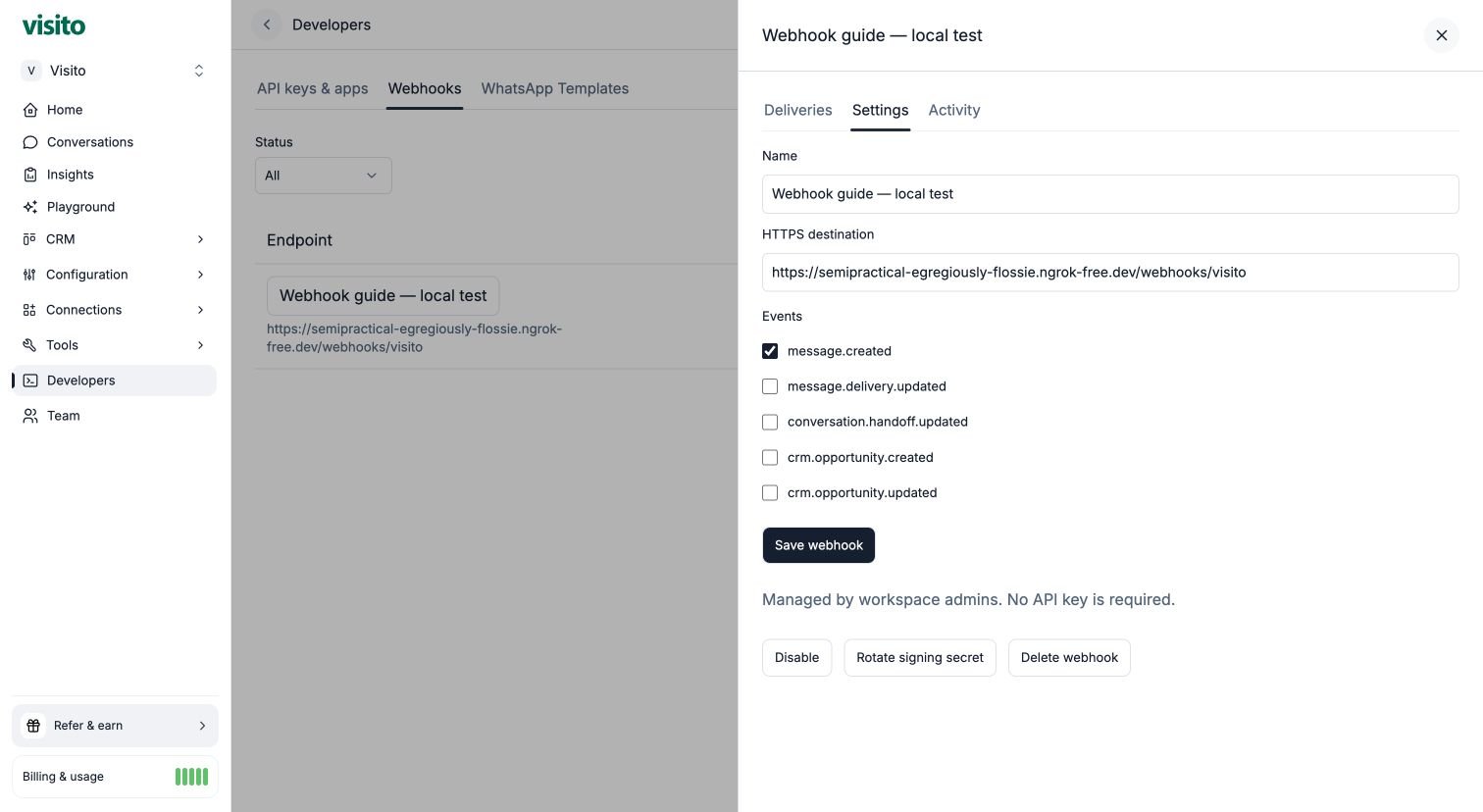 | Action | Consequence |
| - | - |
| Edit | Changes future behavior while preserving the authorization mode. Review the receiver when changing destination or events. |
| Disable | Stops future delivery and cancels queued deliveries. It cannot recall an in-flight request. |
| Enable again | Allows future delivery. Canceled events are not replayed. |
| Rotate signing secret | Shows a new secret once. The old secret becomes invalid for future attempts; coordinate the receiver update. |
| Delete | Stops future delivery. An in-flight request may finish. Save any diagnostic information you need first. |
| Transfer to dashboard management | Explicitly removes dependence on the owning API credential for future delivery; no canceled events replay. |
**Dashboard-managed** subscriptions belong to the workspace. The creating admin leaving or their session expiring does not stop delivery; current workspace admins manage the endpoint.
**Credential-bound** subscriptions created through the API depend on the owning credential's scope, expiry, and revocation. Legacy subscriptions retain this behavior. Dashboard admins can inspect and edit both kinds. Ordinary dashboard edits do not change the authorization mode.
For a credential-bound endpoint, **Transfer to dashboard management** asks you to confirm that future credential revocation will no longer stop delivery. It preserves the destination, signing secret, event IDs, and delivery history and records who transferred it and when. Reverse transfer is not available in this version.
API clients still need webhook scopes and the event-read permissions for affected events to mutate tenant-managed subscriptions. Such mutations do not silently attach the API caller's credential. See the [API contract](/api-docs/webhooks).
## Troubleshooting
| Symptom | Check |
| - | - |
| Cannot create an endpoint | Admin role, valid public HTTPS destination, selected events, signing setup, and worker readiness. |
| Test is unavailable | Active endpoint, active authorization, workspace enrollment, and a ready worker. Respect the one-minute test limit. |
| `receiver_http_error` | The receiver returned non-2xx. Use the HTTP status and your own sanitized logs; check the route and secret file. |
| Signature mismatch | Correct endpoint secret, exact raw bytes, timestamp tolerance, and clock. A rotated secret must be updated in the receiver. |
| Timeout or transport failure | Receiver/tunnel running, public DNS, valid TLS, correct path, no redirects, and response within ten seconds. |
| `unsafe_destination` | Public IPv4 destination required. Do not bypass private-address protection; use your public HTTPS tunnel. |
| No real events, but tests work | Tests do not prove producer capture. Check workspace delivery setup and supported business activity; Playground is excluded. |
| Duplicate event | Expected with at-least-once delivery. Use a unique event-ID constraint and idempotent downstream work. |
## Finish a local test
Disable the test webhook and confirm its disabled state **before** stopping the receiver or ngrok. This avoids leaving an enabled endpoint pointing at an offline laptop. Preserve the delivery history for review. Stop both local processes with Ctrl+C and remove the local secret when you no longer need it.
| Action | Consequence |
| - | - |
| Edit | Changes future behavior while preserving the authorization mode. Review the receiver when changing destination or events. |
| Disable | Stops future delivery and cancels queued deliveries. It cannot recall an in-flight request. |
| Enable again | Allows future delivery. Canceled events are not replayed. |
| Rotate signing secret | Shows a new secret once. The old secret becomes invalid for future attempts; coordinate the receiver update. |
| Delete | Stops future delivery. An in-flight request may finish. Save any diagnostic information you need first. |
| Transfer to dashboard management | Explicitly removes dependence on the owning API credential for future delivery; no canceled events replay. |
**Dashboard-managed** subscriptions belong to the workspace. The creating admin leaving or their session expiring does not stop delivery; current workspace admins manage the endpoint.
**Credential-bound** subscriptions created through the API depend on the owning credential's scope, expiry, and revocation. Legacy subscriptions retain this behavior. Dashboard admins can inspect and edit both kinds. Ordinary dashboard edits do not change the authorization mode.
For a credential-bound endpoint, **Transfer to dashboard management** asks you to confirm that future credential revocation will no longer stop delivery. It preserves the destination, signing secret, event IDs, and delivery history and records who transferred it and when. Reverse transfer is not available in this version.
API clients still need webhook scopes and the event-read permissions for affected events to mutate tenant-managed subscriptions. Such mutations do not silently attach the API caller's credential. See the [API contract](/api-docs/webhooks).
## Troubleshooting
| Symptom | Check |
| - | - |
| Cannot create an endpoint | Admin role, valid public HTTPS destination, selected events, signing setup, and worker readiness. |
| Test is unavailable | Active endpoint, active authorization, workspace enrollment, and a ready worker. Respect the one-minute test limit. |
| `receiver_http_error` | The receiver returned non-2xx. Use the HTTP status and your own sanitized logs; check the route and secret file. |
| Signature mismatch | Correct endpoint secret, exact raw bytes, timestamp tolerance, and clock. A rotated secret must be updated in the receiver. |
| Timeout or transport failure | Receiver/tunnel running, public DNS, valid TLS, correct path, no redirects, and response within ten seconds. |
| `unsafe_destination` | Public IPv4 destination required. Do not bypass private-address protection; use your public HTTPS tunnel. |
| No real events, but tests work | Tests do not prove producer capture. Check workspace delivery setup and supported business activity; Playground is excluded. |
| Duplicate event | Expected with at-least-once delivery. Use a unique event-ID constraint and idempotent downstream work. |
## Finish a local test
Disable the test webhook and confirm its disabled state **before** stopping the receiver or ngrok. This avoids leaving an enabled endpoint pointing at an offline laptop. Preserve the delivery history for review. Stop both local processes with Ctrl+C and remove the local secret when you no longer need it.
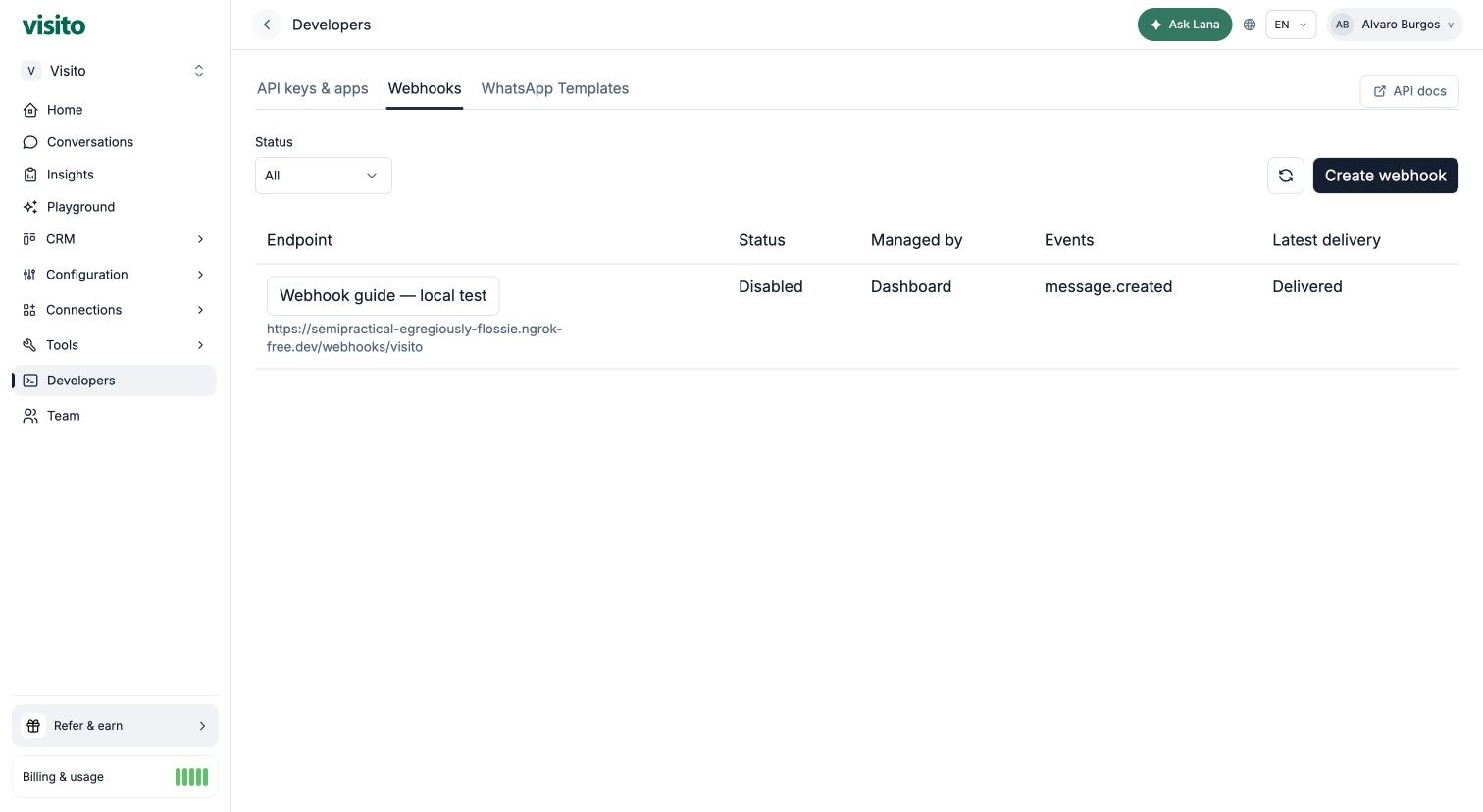 This walkthrough verified a signed synthetic event, a controlled `503`, and automatic recovery to `204` with the same event ID. It does not by itself verify real-event producer capture, all failure cases, or production performance for your receiver.
This documentation is built and hosted on [Mintlify](https://mintlify.com), a developer documentation platform.
This walkthrough verified a signed synthetic event, a controlled `503`, and automatic recovery to `204` with the same event ID. It does not by itself verify real-event producer capture, all failure cases, or production performance for your receiver.
This documentation is built and hosted on [Mintlify](https://mintlify.com), a developer documentation platform.