
Run the example
Download order-status-server.mjs, save it locally, and start it with Node.js:http://127.0.0.1:4191/visito/order-status. local-demo-only is an intentionally public sample token for a restricted local demo. Use a private secret and HTTPS before exposing a real service. The sample does not verify customer identity and must not serve real order data unchanged.
The server has two fixture records:
Follow the request through the server
This annotated excerpt highlights the controller flow. Authentication, body limits, and failure handling remain in the complete downloadable source.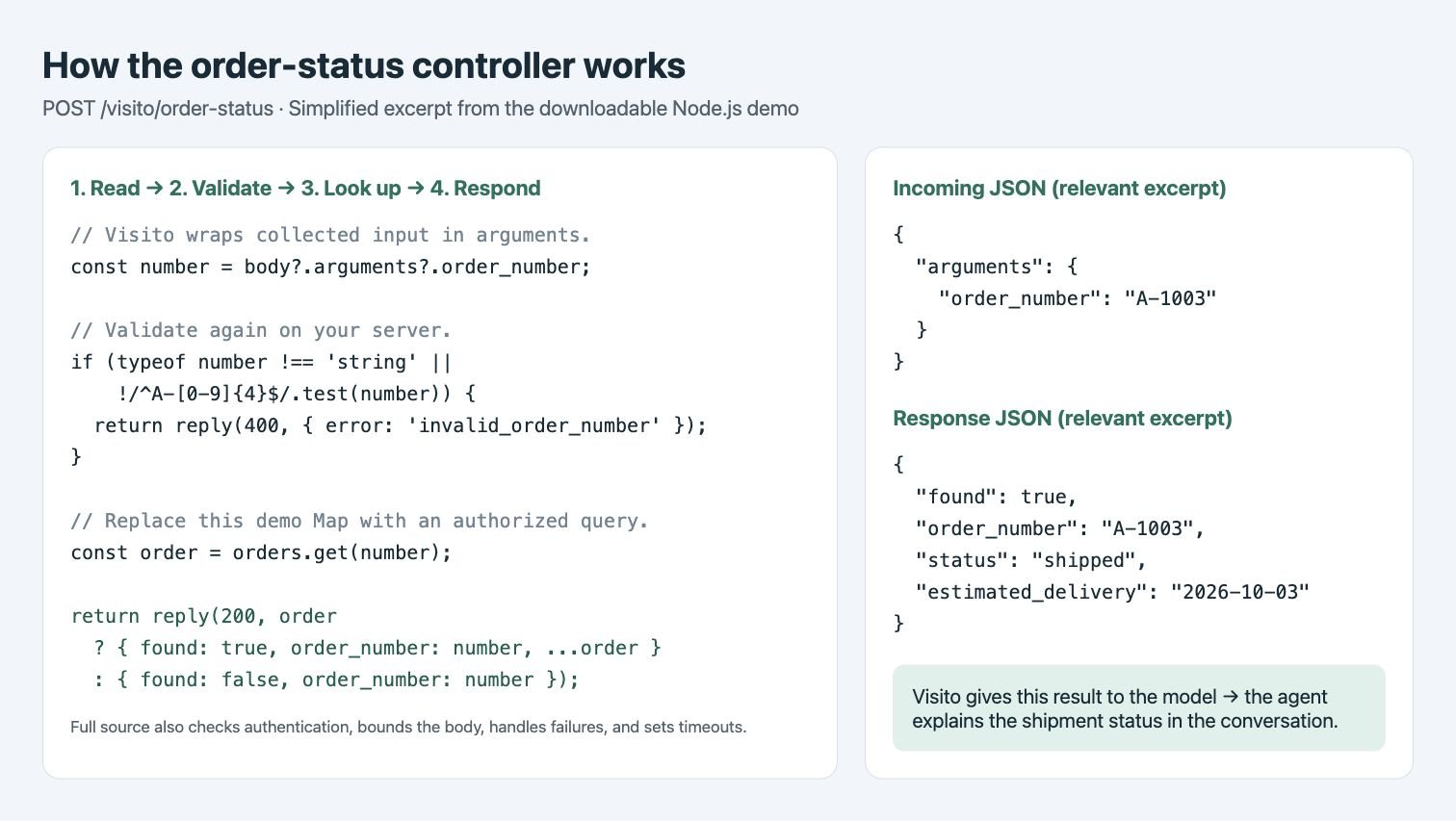
1. Check the route and authentication
The server accepts only POST requests to/visito/order-status. It checks Authorization: Bearer ... against TOOL_DEMO_SECRET before looking up any order. Other routes return 404; missing or incorrect credentials return 401.
2. Read a bounded JSON body
The sample reads at most 4 KiB. Oversized requests return 413, invalid JSON returns 400, and server request/header timeouts are 10 seconds. Its logs record only the synthetic order number, whether it matched, and the source; they do not print the authorization header.3. Extract the parameter
For POST, Visito sends the action’s input insidearguments. The relevant code is:
order_number comes from the customer through the action input schema. It is not read from the URL path or from body.order_number. The sample accepts A- followed by four digits. Validate again server-side even when the schema declares a required string.
4. Look up and return the record
orders.get(number) with an authorized query or provider call. Check the requester’s access before returning the record. Keep provider credentials on your server. Missing orders and unavailable providers are different outcomes; do not report an outage as found: false.
5. Let Visito use the result
Visito reads the JSON response and returns it as the tool result to the model. The model continues the same conversation with those facts and writes the customer-facing answer. This is why a clear status, an explicit estimate, and a separatefound field are useful. HTTP 200 alone does not establish a business outcome.
Check the request and response
In a second terminal:
The captured local verification checked known/unknown orders, numeric input, missing authentication, and the simulated provider failure directly. Webchat checked missing-number collection, a known order, an unknown order, and the provider failure. Other table rows describe the sample’s validation paths, not additional captured Webchat tests.
Live conversation metadata can include
tenantId, conversationKey, conversationId, channel, and eventId. The direct Visito test endpoint uses tenantId and source: "developer_test"; do not require a live conversation ID for those tests. Metadata provides context, not proof of order ownership.
Make the endpoint reachable
The captured test ran the server on the same local Docker network as the tool gateway. For a similar local Compose setup, replace
YOUR_LOCAL_NETWORK with the actual network, then run from the folder containing the downloaded file:
http://visito-order-status-docs:4191/visito/order-status in the local action. The published port is restricted to host loopback; the server is also reachable on the chosen Docker network. Do not reuse this hostname in hosted Visito. No public tunnel was used for the captured run.
If your existing provider accepts GET, Visito sends action inputs as query parameters. POST sends { "arguments": { ... }, "meta": { ... } }. Dynamic provider paths, different bodies, or OAuth refresh belong in an adapter. See the full contract.
Test the saved definition
Configure it under Connectors → Add your own system → API-based, with POST, Bearer authentication, an 8-second timeout, and Read only enabled. Use Playground-only mode for a Playground test, or Active for an explicitly controlled Webchat test. For a direct API test, obtain the stable action IDhttp:<toolId> from Action configurations. You can keep the action Off for this explicit test. The Visito API key needs actions:http:execute; listing definitions additionally requires action_configurations:read.
ok, output, and error; an HTTP 200 from the test API can still contain ok: false. A repeated test is another invocation. For write actions, never blindly repeat a request whose outcome is uncertain. The Visito API key is separate from the endpoint’s TOOL_DEMO_SECRET.
Inspect and clean up
Use Actions → History to inspect the input, response, HTTP status, method, endpoint, and timing. The Saved request data panel may show only the action arguments; it is not a complete wire capture. The POST wrapper above remains the contract.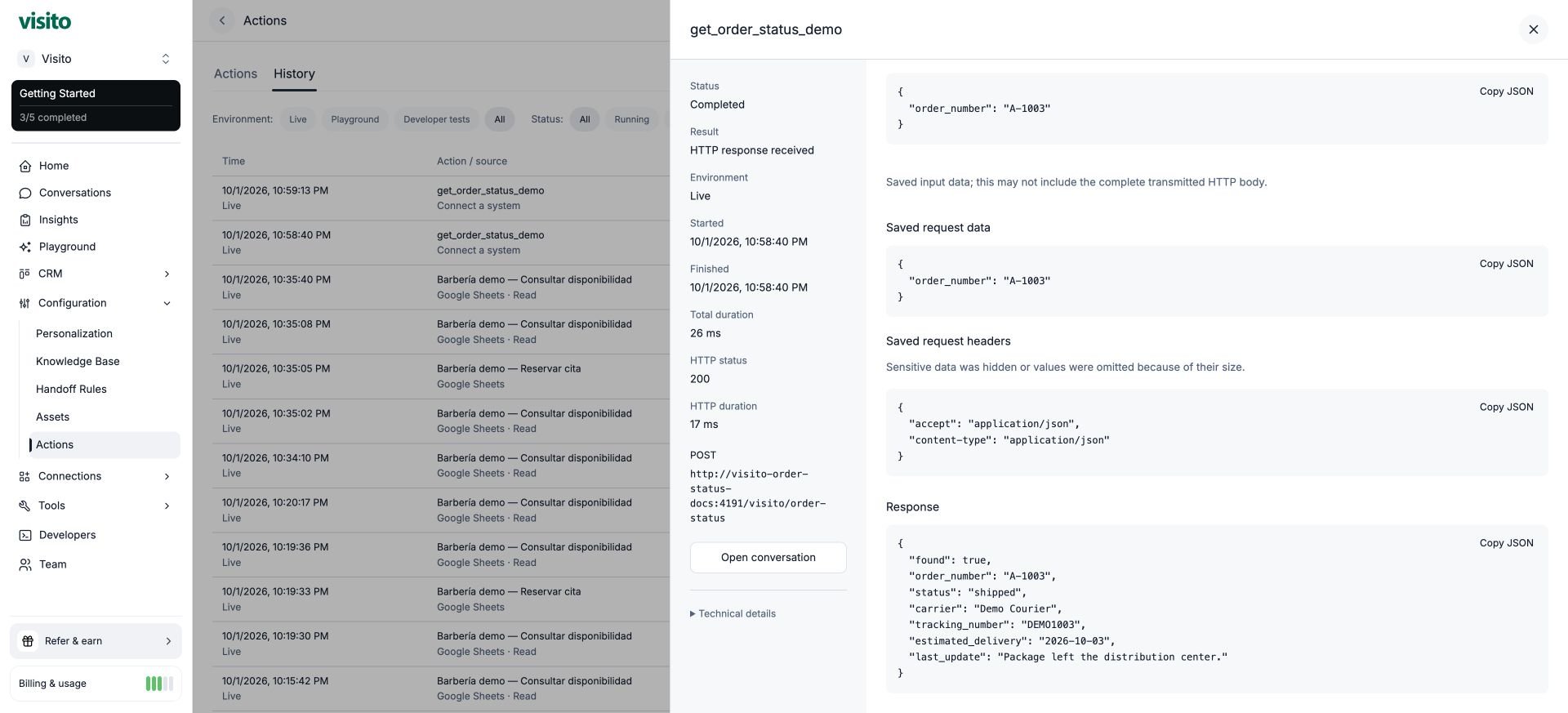
docker stop visito-order-status-docs. Retain history for diagnosis. Before production, add customer authorization, real source data, restricted responses, and tested failure/routing behavior. No production endpoint was deployed by this demonstration.