
Understand conversation states
Visito tracks several independent signals on each conversation. Use the signal that matches the work you need to do.Opening a conversation only clears its unread state. It does not resolve a handoff, complete an internal review, clear Needs reply, or change the owner.
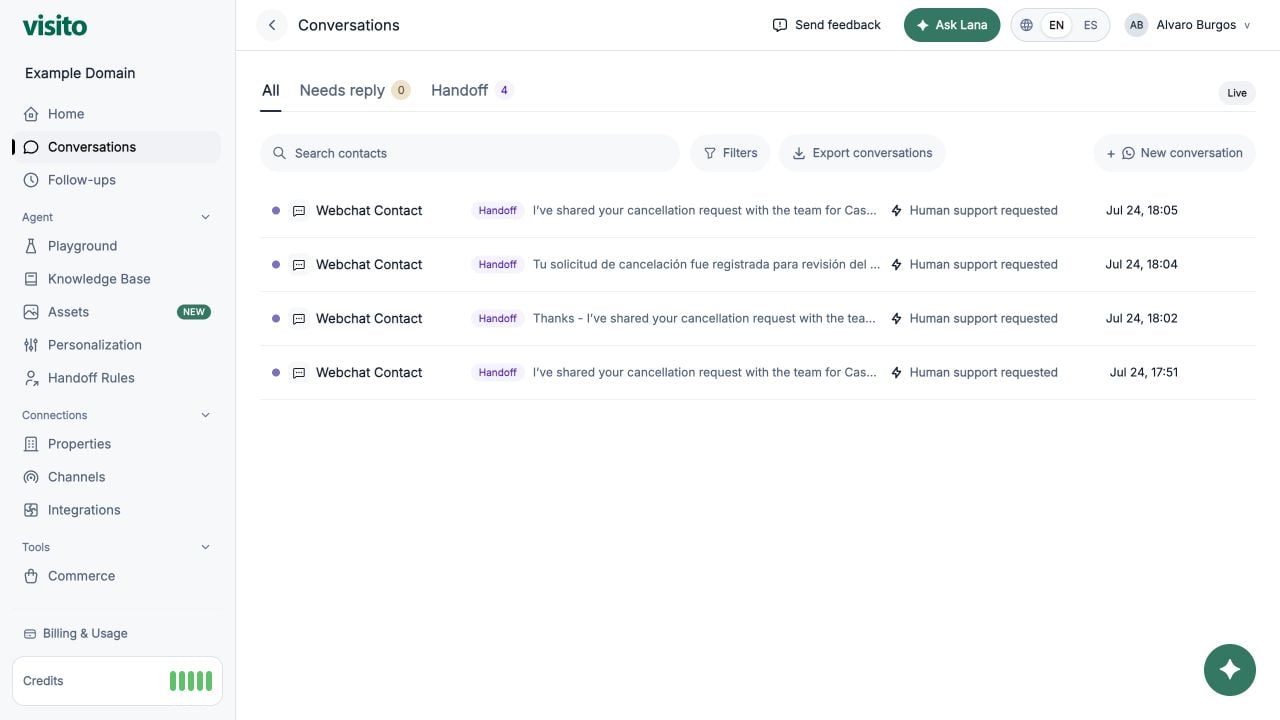
Use inbox views
- All - all conversations matching the current filters.
- Needs reply - conversations waiting for an operator response.
- Handoff - conversations escalated by the AI for human action.
Search and filters
Search contacts by name or identifier. Open Filters to narrow by:- Channel
- Owner, including Mine
- Conversation status: Active, Blocked, Archived, or Any
- Response mode: AI or Manual. Frozen conversations appear under Manual with a timer
- Actions such as availability checks, quotes, checkout creation, and human support requests
Open a conversation
Select a row to open the conversation drawer.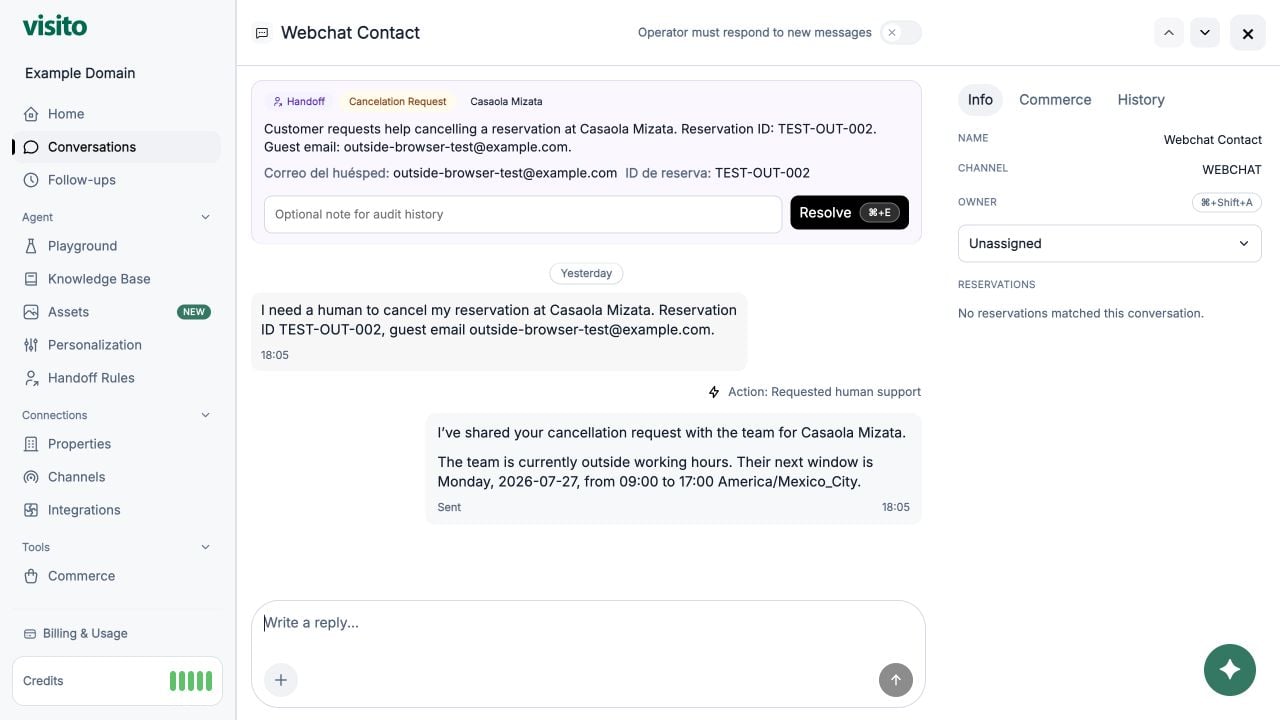
- Full message history and date separators
- Images, video, audio, and files when available
- Reply references and delivery state
- The latest detected conversation language, confidence, and mixed-language indicator when available
- Customer information, assignment, reservations, commerce, review, and history details
- Previous/next conversation navigation
- Manual reply composer with file attachment
- Handoff or needs-reply resolution controls
Assign an owner
Use the owner selector in the conversation drawer or row actions to assign a teammate. Choose Unassigned to remove the current owner. Assignment identifies who is responsible for the whole conversation. It does not send a message, change the AI or Manual response mode, resolve attention, or change the conversation status. Use the Owner → Mine filter to focus on conversations assigned to you.Conversation owner vs review reviewer
These assignments are separate:
A conversation can be owned by one teammate while its internal review is assigned to another. Changing the reviewer does not change the conversation owner.
Handle an AI-to-human escalation
A handoff is a customer-facing escalation created when a Handoff Rule matches or the customer asks for a person. While it remains unresolved, Visito keeps new messages in the thread, marks the conversation for attention, and pauses AI replies.1
Open the handoff
Open it from Home or the Handoff Conversations view. Review the handoff reason, the customer’s messages, captured details, missing fields, and working-hours context.
2
Assign responsibility
Choose a conversation owner when one teammate should carry the request through completion.
3
Take action and reply
Complete the operational task and reply to the customer when a response is needed. A manual reply does not resolve the handoff automatically.
4
Resolve the handoff
Add an optional resolution note describing the outcome, then select Resolve handoff. This closes the handoff and clears the needs-reply state created by that handoff.
If AI or Manual controls are disabled
When a handoff is open, Visito keeps the conversation under human ownership until the escalation is resolved. During that time, response-mode controls can appear disabled because the open handoff is the active policy controlling AI replies. To let the AI respond again:- Finish the customer request or decide that no more operator action is needed.
- Add a short resolution note if useful.
- Select Resolve handoff.
- Refresh the conversation if the control still appears disabled.
Request a manual internal review
Use an internal review when a teammate should inspect a conversation without escalating the customer or pausing the AI. Common uses include quality assurance, coaching, checking a sensitive answer, and confirming that a process was followed.1
Mark the conversation for review
Open the conversation, find the conversation actions, and select Mark for review.
2
Add context
Enter an optional note explaining what the reviewer should check. Choose a reviewer or leave it Unassigned for a shared review queue.
3
Review the thread
The reviewer opens the conversation, reads the request details, and can reassign the review if another teammate is better suited.
4
Complete the review
Add an optional resolution note and select Mark reviewed. The review history records who requested, reassigned, and completed it.
An internal review is invisible to the customer and does not pause AI replies. Use a handoff when a person must take over the customer request, and use an internal review when your team needs an operator-only check.
Reply manually
Type a message in the composer and select Send, or press Enter. Use Shift+Enter for a new line. You can attach one supported file and reply to a specific message. Manual response mode is different from sending one manual reply. In Manual mode, Visito stores new customer messages and marks the thread as needing a reply instead of generating an AI response. Assigning an owner or reviewer does not turn on Manual mode.Pause AI replies with Auto-Freeze
Auto-Freeze gives an operator temporary control after sending a message. It prevents the AI from replying immediately while the teammate is still working with the customer.When you send from the Visito dashboard
The Auto-Freeze selector appears in the composer when the reply contains text.1
Write the reply
Enter a text reply in the conversation composer. Auto-Freeze is On for 30 minutes by default.
2
Choose the control window
Open Auto-Freeze and select 5, 10, 15, 30, or 60 minutes. Choose Off when the AI can continue responding immediately after your message.
3
Send the message
After a successful send, Visito starts a new freeze for the selected duration. The conversation header shows Manual, the end time, and the reason for the pause.
When a teammate replies from a Meta channel
Visito can also receive an outbound message echo from a connected WhatsApp, Instagram, or Messenger account. An echo tells Visito that a message was sent directly from a native Meta surface instead of the Visito dashboard. When the outbound message does not match one already sent by Visito:- Visito adds the message to the conversation history as a native channel message.
- The existing needs-reply state is cleared because a teammate responded.
- Visito freezes AI replies for 30 minutes from the time of that message.
This automatic Meta freeze helps prevent the AI and a teammate working in Meta from replying at the same time. To keep human control beyond the temporary window, switch the conversation response mode to Manual.
What happens during and after a freeze
Auto-Freeze is temporary. Manual mode remains active until a teammate changes it, and an unresolved handoff continues to suppress AI until it is resolved.
Freeze vs Manual mode
Resolve attention
- For a handoff, finish the request, add an optional resolution note, and select Resolve handoff.
- For an internal review, complete the check, add an optional resolution note, and select Mark reviewed.
- For a needs-reply thread, select Mark done if no message is needed.
Archive or block a conversation
Use the lifecycle action that matches your intent:
Archived and blocked conversations are hidden by the default Active status filter but remain available through the status filter.
Recommended operator decision
Lifecycle and response-mode actions are available in the conversation drawer and row actions. Available controls depend on the channel, role, and current state.
Export uses the current workspace and filter context.
Configure AI-to-human handoffs
Create handoff scenarios, collect useful customer details, and configure working hours.