
Connecting WhatsApp, Instagram, or Messenger?
Choose the correct Meta setup path, complete the readiness checklist, and verify message routing.
Supported channels
Connect a new number or an existing WhatsApp Business App number.
Connect a professional Instagram account through Meta authorization.
Messenger
Connect one or more authorized Facebook Pages.
Webchat
Share a public link or install and customize the website widget.
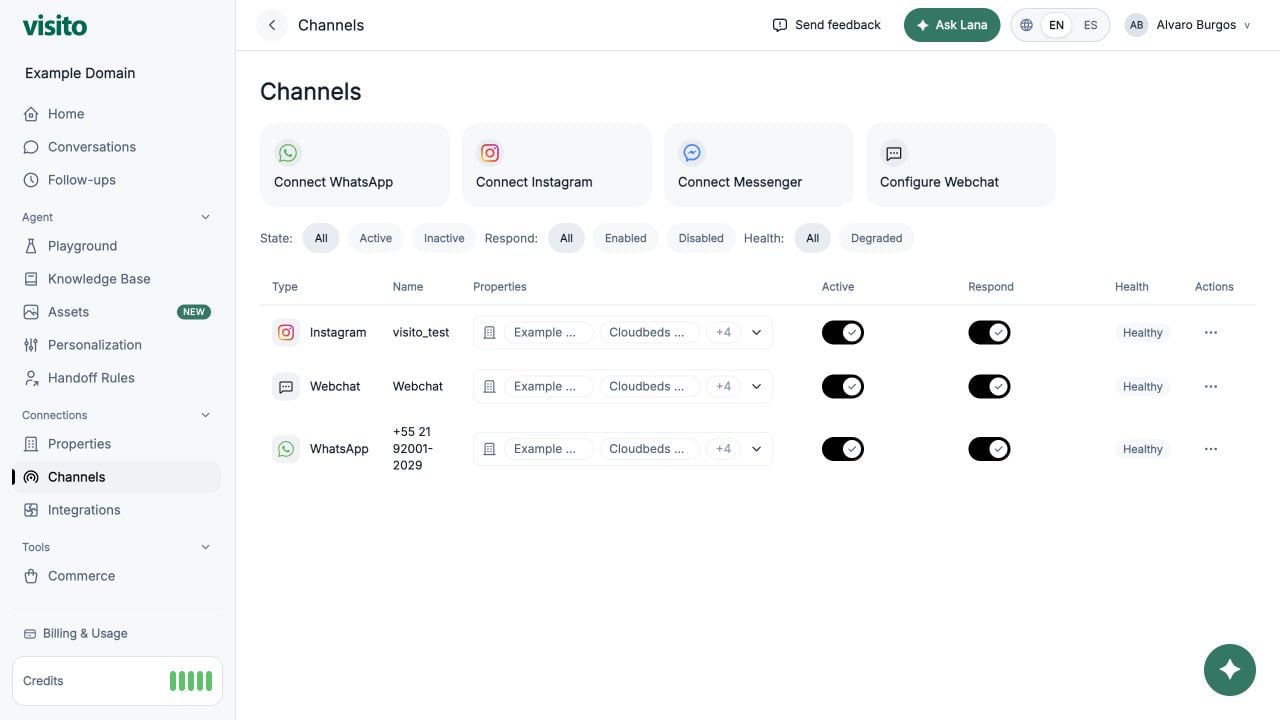
Channel table
Use filters for:- State: All, Active, or Inactive
- Respond: All, Enabled, or Disabled
- Health: All or Degraded
Business assignments
Select Assign businesses in a row to choose which active businesses use the channel. A channel can serve multiple businesses.Active and Respond
- Active controls whether the channel connection is enabled.
- Respond controls whether the agent may respond on that channel.
If a connection requires an upgrade
When plan access is enforced for a Free workspace, Webchat remains available while connecting or reactivating WhatsApp, Instagram, or Messenger requires Starter or a higher plan. The connect action remains visible and opens an upgrade prompt with a link to Billing & Usage → Plans. An upgrade prompt does not disconnect an existing active Meta channel. You can continue to view and manage that connection; the plan gate applies to creating or reactivating a premium channel connection.Plan availability can change. The plan comparison shown in the dashboard is the source of truth.
Connect WhatsApp
- Select Connect WhatsApp.
- Complete Meta Embedded Signup.
- Select the phone numbers to connect.
- Confirm the selection.
Connect Instagram
- Select Connect Instagram.
- Complete Meta authorization with an account that has the required professional-account access.
- Return to Visito and confirm the connected account appears.
Connect Messenger
- Select Connect Messenger.
- Complete Meta authorization.
- Select one or more Facebook Pages.
- Confirm the selected pages.