
These controls are part of the upcoming web dashboard release. They are not yet available in the native mobile app.
Choose which stories receive a response
- Open Connections → Channels in Visito on the web.
- Select the connected Instagram account to open its right-hand panel.
- Under Automatically respond to, adjust either switch:
Both switches are On by default, preserving your existing behavior. Each change saves automatically. Wait for it to finish before changing the other switch. If saving fails, the previous value is restored and an error appears; try again.
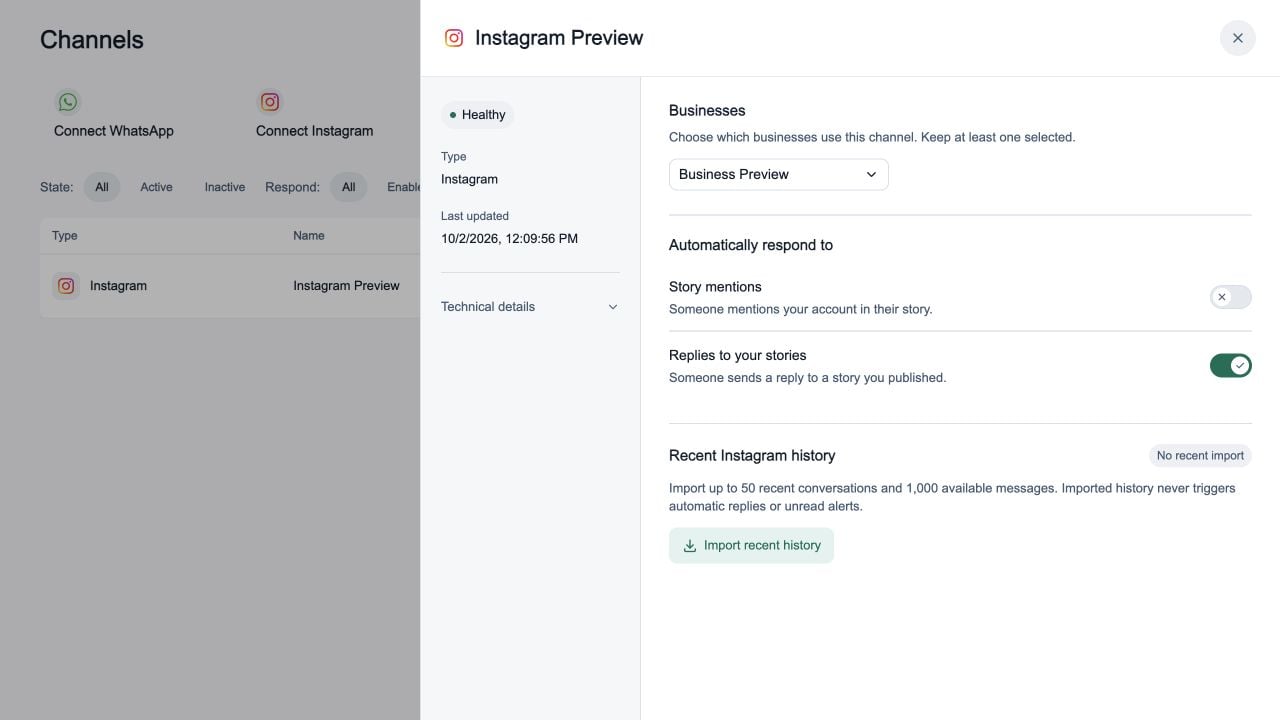
Stop automatic replies to mentions
If you want to avoid an automatic reply when someone mentions your account in a story, turn Story mentions Off and leave Replies to your stories On. With this combination:- Story mentions do not trigger an automatic response.
- Replies to stories you published remain eligible for an automatic response.
- Ordinary direct messages continue to follow your existing response settings.
What happens to ignored stories
- They remain visible in the conversation history, and your team can reply manually while Instagram allows replies.
- They do not create a new unread or needs-reply alert, reopen an archived conversation, or start AI responses, automated handoffs, or follow-ups.
- They do not clear pending work from another message, such as a normal direct message awaiting a response.
- Turning a switch back on applies to future events. It does not trigger replies to previously ignored stories.
The channel-wide Respond setting still controls automatic responses for the entire account. Turning a story switch on does not override Respond Off, an inactive channel, or other response restrictions.