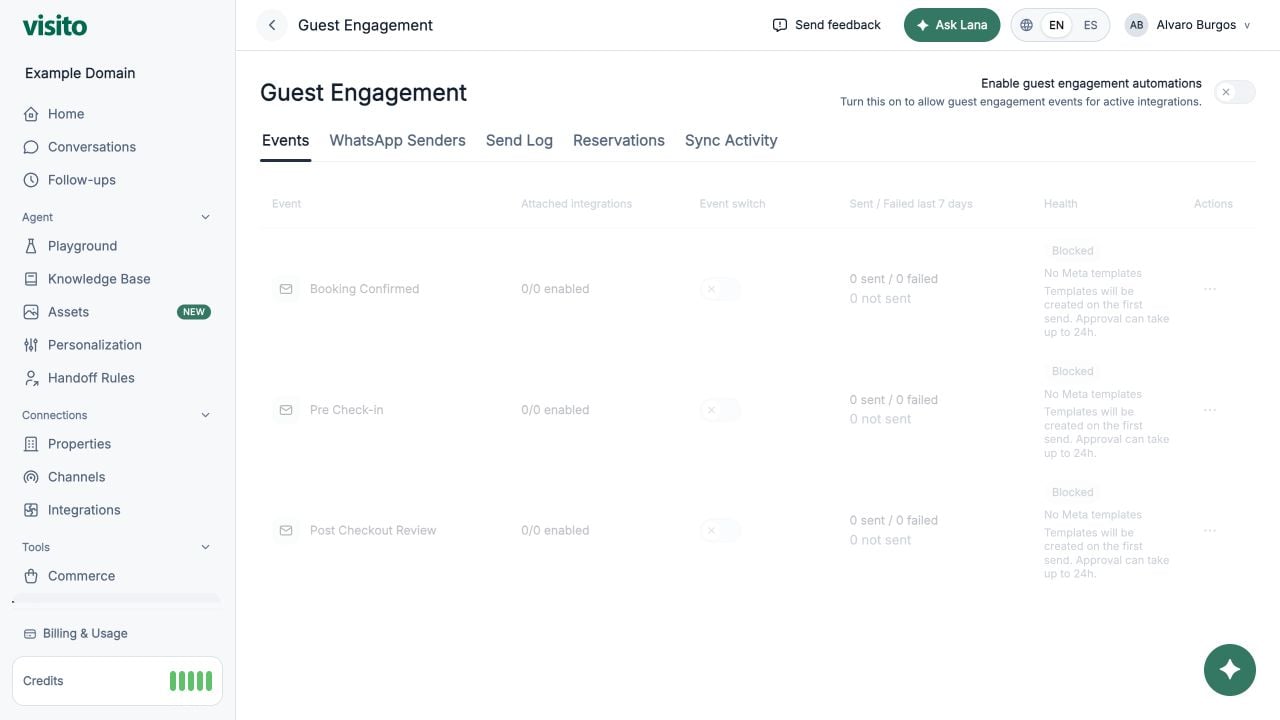
Open Tools → Guest Engagement to configure reservation lifecycle messaging.
Master switch
Turn on Enable guest engagement automations to allow enabled events to run for active integrations.
Events
Supported events include:
- Booking Confirmed
- Pre Check-in
- Post Checkout Review
The Events table shows attached integrations, event state, recent send results, health, and actions.
Open an event to review:
- Activation state
- Attached integrations
- Sender readiness
- Message preview
- Meta template state
- Review URL configuration when applicable
WhatsApp Senders
Map connected WhatsApp senders to eligible reservation integrations. Resolve missing or ambiguous sender assignments here.
Send Log
Review lifecycle message attempts. Filter by integration, message type, outcome, or reservation ID.
Each row can include event, reservation, sender, outcome, reason, and linked conversation.
Reservations
Search and filter mirrored reservations from connected providers. Open a reservation for stay, guest, provider, and lifecycle details.
Sync Activity
Review reservation synchronization receipts, duration, counters, freshness, and errors.
When a message does not send, check the master switch, event switch, active integration, WhatsApp sender mapping, guest phone number, and Meta template state.