
Start with a small rule set
Begin with high-value scenarios:- A specific team task, such as preparing an invoice
- A serious business or safety issue
- A payment, charge, or refund dispute
- An order, appointment, or account change the agent cannot complete
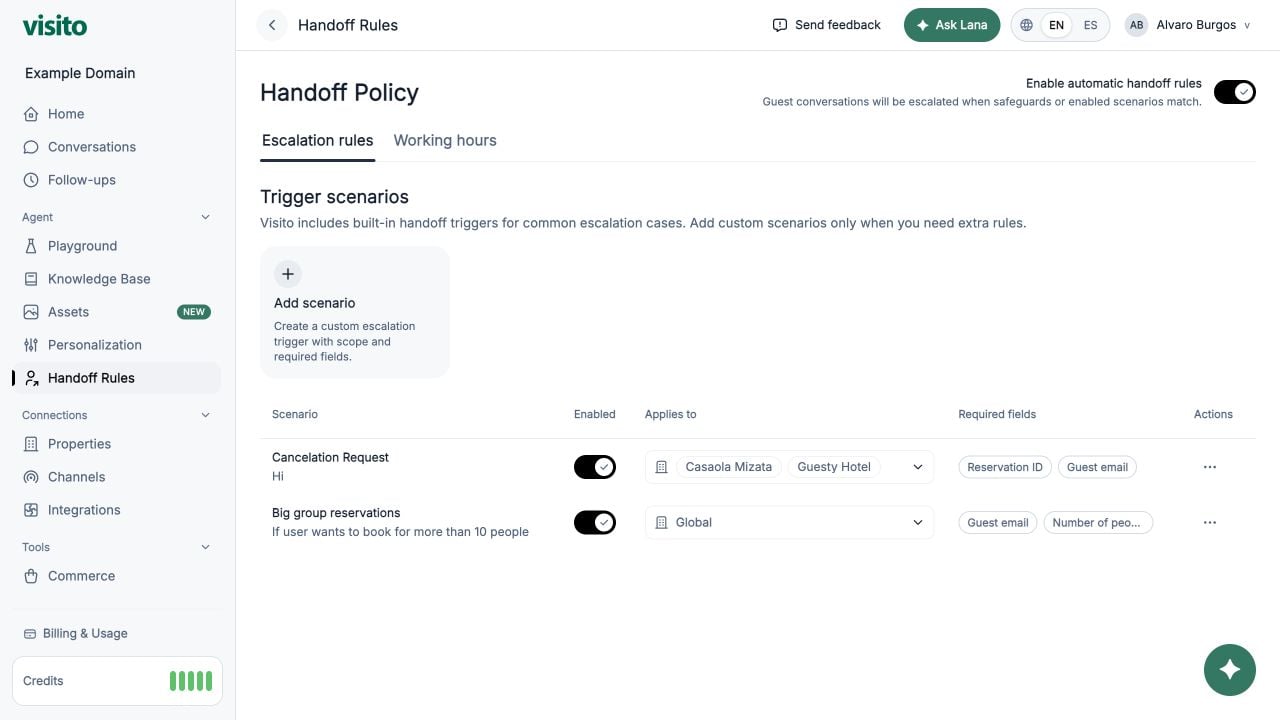
Configure a scenario
1
Open Handoff Rules
Go to Configuration → Handoff Rules and confirm Enable automatic handoff rules is on.
2
Add a scenario
Select Add scenario and give it a name an operator will understand.
3
Describe the trigger
State what should trigger the handoff and, when helpful, what should not.
4
Choose business scope
Use selected businesses when the workflow or responsible team differs by location.
5
Request essential fields
Collect only information the operator needs to take the next action.
6
Save and test
Test one message that should trigger the rule and one similar message that should not.
Where handoff rules apply
Handoffs use a separate workflow. Their clarification and acknowledgment do not load the normal Knowledge Base context or Custom Instructions. Configure scenario triggers and required fields here rather than in a knowledge document or personalization rule. Required fields are prerequisites for the matched scenario. If a field is missing, Visito asks for it before creating that scenario’s handoff. Only require information that can safely delay escalation. This setting does not mean “ask optionally while escalating immediately.” An explicit request to speak with a person has its own handoff route. Do not assume that creating a scenario named “Customer requests a person” makes its required fields apply to that route or to every handoff. Test explicit requests separately from configured scenarios. For immediate escalation, do not add contact details as required prerequisites. Asking for optional contact details while preserving immediate escalation is not provided by the required-field setting. Prechat contact fields are a separate webchat setting that applies before the conversation, not only at handoff. Open Handoff Rules in your active workspace.Copy-ready scenarios
Invoice request
Urgent service or safety issue
Payment or charge dispute
Choose required fields deliberately
Scope each scenario to the businesses where it applies. Do not request information already present in the conversation or a connected system unless it must be confirmed.
Configure working hours
Open the Working hours tab and enter the hours when a person can respond. The schedule uses the AI timezone configured in Personalization. Test the same handoff:- During working hours
- Outside working hours
- On a closed day
Test both sides of every rule
Testing non-triggers is essential. It reveals rules that are so broad they interrupt normal self-service.
Build an operational loop
- Review handoffs in Home and the Handoff Conversations view.
- Read the escalation reason, captured details, missing fields, and latest customer messages.
- Assign a conversation owner so responsibility is explicit.
- Complete the operational task and reply to the customer.
- Add a short resolution note, then select Resolve handoff.
- Identify false positives, missing context, or missing scenarios.
- Update one rule at a time and retest it.
Write useful resolution notes
A resolution note should let another teammate understand the outcome without rereading the entire thread.Use internal review for quality checks
Do not create a customer-facing handoff only because a conversation should be audited. Use Mark for review for:- Quality assurance and coaching
- Policy or brand-standard checks
- Reviewing an unusual AI answer
- Confirming that an operator followed a process
Review handoff performance regularly
Sample resolved handoffs every week and look for:- Rules that trigger on harmless questions
- Missing fields that force operators to ask the customer again
- Handoffs that remain open after the task is complete
- Vague resolution notes
- Requests that should become a new knowledge-base answer or automated action
Handoff Rules reference
Review switches, fields, business scope, working hours, and the operator resolution flow.
Conversations operator guide
Learn assignment, internal review, needs-reply, archive, block, and handoff workflows.