
Separate facts from behavior
Keeping these responsibilities separate makes information easier to update and behavior easier to test.
For booking flows, use Custom Instructions for conversational guidance and integration settings for connected capabilities. Handoff triggers and required fields belong in Handoff Rules: their separate clarification and acknowledgment flow does not load normal knowledge or personalization instructions. Review the handoff boundaries.
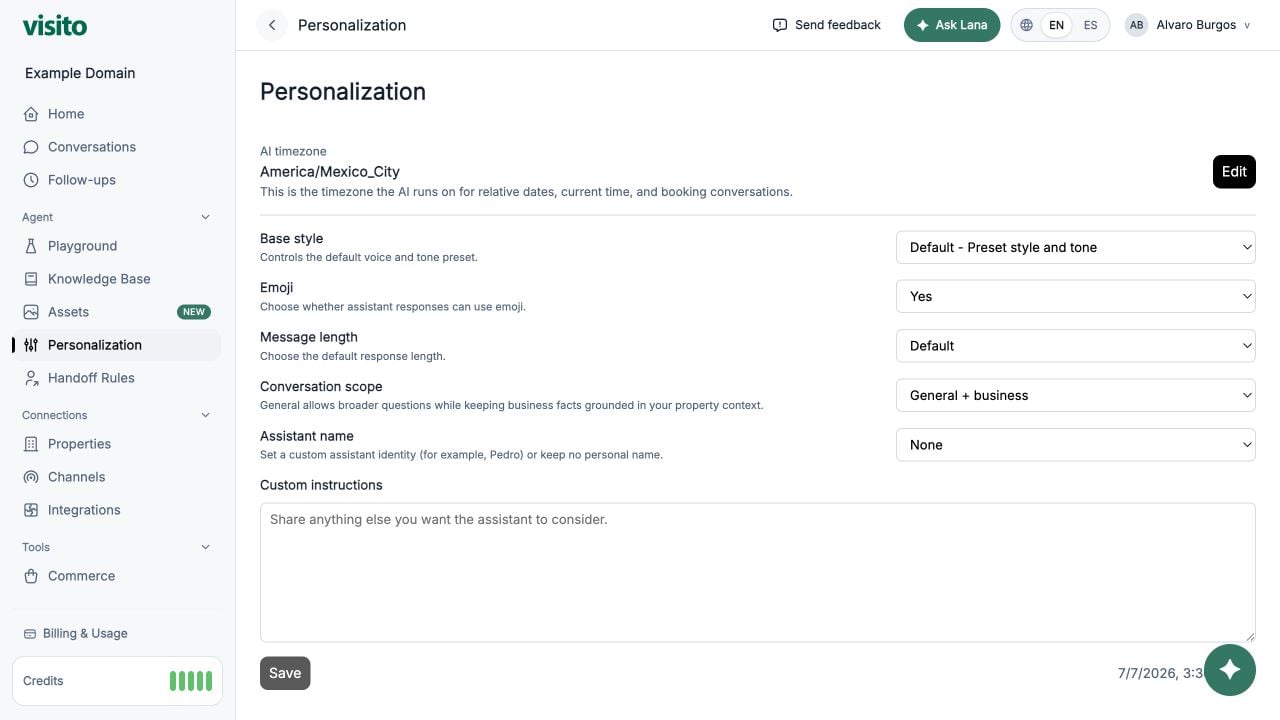
Add Custom Instructions
1
Open Personalization
Go to Configuration → Personalization.
2
Set the broad preferences first
Choose the base style, emoji preference, message length, conversation scope, and assistant name.
3
Add only the missing behavior
Use Custom Instructions for specific rules not already represented by those controls.
4
Save
Select Save after reviewing the complete configuration.
5
Test with a new chat
Open Playground and start a new chat so the test has a clean context.
Starter template
Replace the bracketed content and remove rules that do not apply:Write instructions the agent can follow
Good instructions are:- Specific - describe an observable response or decision.
- Short - one rule per bullet.
- Prioritized - put important accuracy and escalation rules first.
- Compatible - avoid rules that contradict each other or the Knowledge Base.
- Testable - you can write a Playground message that proves whether the rule worked.
Vague versus testable
Useful instruction patterns
Concise operational responses
Avoid accidental promises
Multi-business clarification
What to avoid
- Passwords, API keys, private links, or other secrets
- Long copies of policies that belong in the Knowledge Base
- Instructions to ignore product safeguards or connected-system results
- Rules that promise availability or prices without a provider result
- Handoff triggers that should be configured and tested in Handoff Rules
- Dozens of overlapping tone requirements
- Hidden operational notes that should instead become a handoff
Test the instructions
Use a new Playground chat and test:- A simple FAQ that should receive a direct answer
- A question missing the business
- A request the team must confirm
- A complaint
- An explicit request for a human
- A question outside the configured business scope
Personalization reference
Review the available tone, response, scope, name, and Custom Instructions controls.