Commerce work appears as a general ticket when a purchase needs fulfillment or a booking needs attention. Select Commerce in the queue’s Source filter to focus on this work. A Commerce badge identifies its source and work reason. It is still a general ticket. Some purchases have a linked conversation; others appear as Purchase and have no conversation to open.

Inspect the purchase

Open the ticket to see the purchase name, amount, payment, fulfillment, refund and booking states. Use Open Commerce for the purchase’s wider context. Use Open conversation when a conversation is linked.
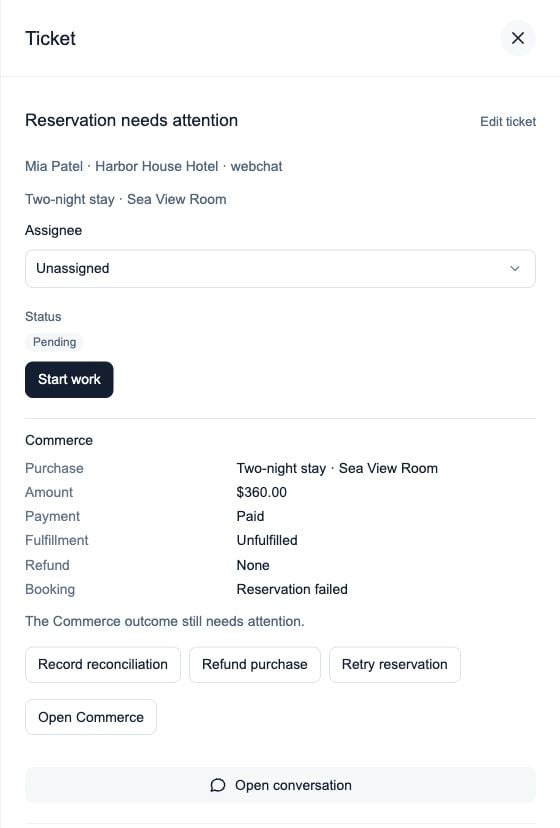
Commerce ticket showing a paid purchase, unfulfilled work, no refund and a failed reservation, with Commerce actions

Payment and booking are separate: this paid purchase still has a reservation issue.

Assign a person and select Start work to track responsibility and progress. You can edit the open ticket’s title or description and add internal notes without changing the purchase.

Complete the underlying work

Available controls depend on your access, the purchase type and its current state. Commerce changes require the appropriate administrator access. Record reconciliation documents a verified external outcome or that no action is required. It does not turn an external confirmation into provider-confirmed booking success or rewrite payment history. Refunds and reservation retries keep their existing eligibility checks and confirmations. Ticket assignment, notes and Start work never perform these actions or send a guest message.

When does the ticket close?

Commerce tickets resolve after a qualifying outcome: fulfilled routine work, a confirmed full refund, a successful provider booking or documented reconciliation of the current issue. Pending, partial, failed or uncertain operations keep the work open. Generic Resolve and Cancel ticket cannot bypass these checks. If the outcome is uncertain, inspect the latest purchase and provider evidence before trying again. The open ticket can update when the review reason changes, while keeping its human owner. If completed work later has a new actionable issue, a new ticket cycle can appear. The earlier closed ticket remains in history.

If purchase details are unavailable

Ticket access and purchase access are separate. You may be able to assign a ticket or leave a note without being allowed to inspect its purchase evidence. Ask your workspace administrator to review Commerce access. Unavailable details should be checked again; they do not confirm success or failure. Return to Tickets for queue filters, status groups and the Home shortcut.