
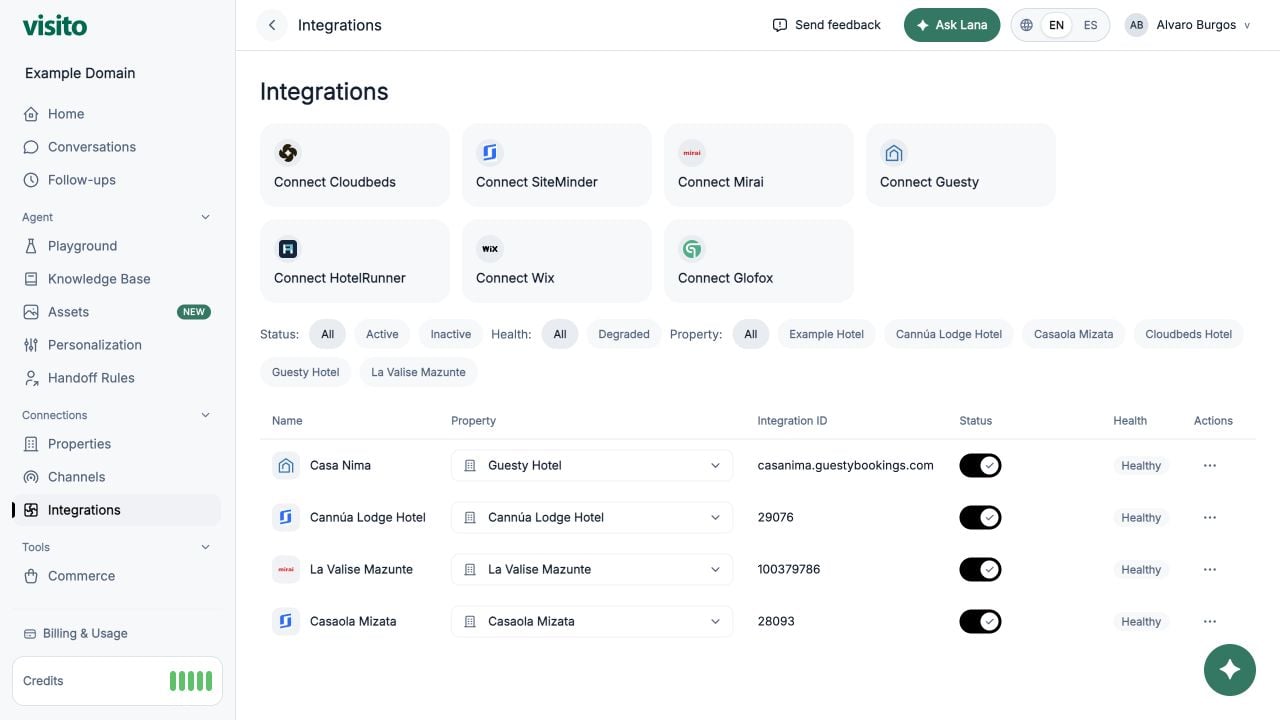
Supported providers
- Google Sheets
- Cloudbeds
- SiteMinder
- Mirai
- Guesty
- HotelRunner
- Wix Businesses
- Glofox
Connect a provider
Select the provider’s Connect button and complete its flow. Cloudbeds and Google Sheets use OAuth. Other providers use provider-specific URLs, identifiers, or credentials. Google Sheets connections manage the Google account. Configure spreadsheet reads, updates, and row creation in Actions, with independent column permissions. Set up Google Sheets actions or follow the hairdresser booking example. After connection:- Assign the integration to an existing business, or create a business for it.
- Confirm the integration is active.
- Review the health state.
- Test the expected booking or business flow in Playground.
Filters and table
Filter by status, health, or business. The table shows provider name, business, integration ID, active state, health, and actions.Business assignment
Use the Business selector in a row to:- Assign an existing business
- Remove the current assignment
- Create a new business for the integration